Setup Guide

Build your AI ecommerce team, step by step

Duplicate the tracker, set up Claude with the Polar MCP and Notion connectors, then schedule your agents. Live in under 30 minutes.
Polar Analytics

Polar Analytics account

Connect Shopify, Meta, Google, Klaviyo. The Polar MCP feeds clean, attributed live data to your agents.

Connect your data →
Claude

Claude Desktop Cowork

Cowork mode runs and schedules the agents. Download the latest version (it has /schedule) and set the model to Opus.

Download Claude →
Notion

Notion workspace

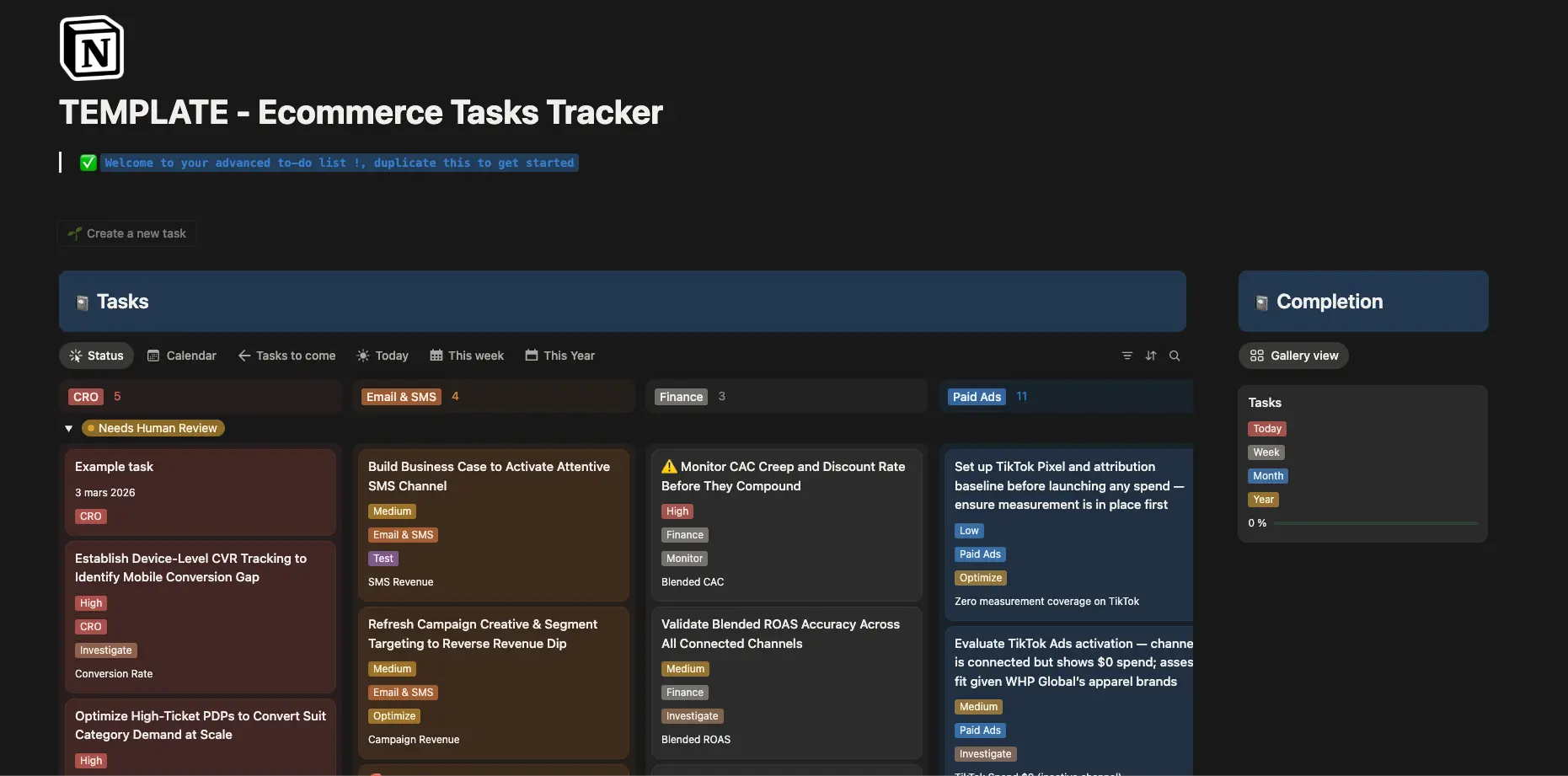
Duplicate the Ecommerce Tasks Tracker template, then connect the Notion connector in Cowork so the agents can write tasks.

Duplicate the template →
1

Duplicate the template & set up Cowork ~5 minutes

Get the tracker, the connectors, and the model in place.
How to
1
Open the Ecommerce Tasks Tracker template, click Duplicate to copy it into your workspace, then copy your database URL from the browser bar. You will paste it into every prompt where it says YOUR_NOTION_DATABASE_URL.
Ecommerce Tasks Tracker Notion template
2
Download Claude Desktop at claude.ai/download (latest version, it has /schedule). Switch from Chat to Cowork mode and set the model to Opus.
3
Connect the Polar Analytics MCP connector. This is what gives the agents access to your live data (Shopify, Meta, Google, TikTok, Klaviyo, Amazon, GA4). Setup guide: /using-polar-mcp-in-claude.
4
Enable the Notion connector in Cowork so the agents can write tasks into your database.
Important: the template comes pre-configured with the exact properties the agents output (Priority, Owner, Status, AI Agent, Impact Metric…). Don't rename the columns or the agents won't be able to write to it.
Duplicate the template
2

Test, then schedule your agents 10-20 minutes

Run once to verify, then put each agent on a schedule.
Test run, before scheduling
  • Copy the master prompt (all 10 agents) or a single agent prompt from the catalog below.
  • Replace every YOUR_NOTION_DATABASE_URL with your duplicated database URL.
  • Run it once manually. This populates Notion directly, so you can verify it works and tune the output before scheduling.
Schedule with /schedule

In Cowork, type /schedule, paste the agent prompt, set the cadence, and confirm. The agent now runs automatically and pushes tasks to Notion. Recommended cadence:

0 8 * * 1 Agents 1-9 (Manager, Meta, Google, TikTok, Email/SMS, Merch, Pricing, CRO, CFO) · every Monday 8am
0 8 1,15 * * Agent 10 (Retention & LTV) · 1st & 15th of each month
Pro tip: you can deploy all 10 agents in one session. Just repeat the /schedule step for each prompt, or paste the master prompt to run the whole team at once.
Get the 10 agent prompts
3

Let the team run the payoff

Open Notion to a prioritized worklist, every week, on autopilot.
What this unlocks

A tracker that fills itself.

Every Monday morning, the agents pull live data through the Polar MCP, analyze it, and write prioritized tasks into your Notion tracker, owner attached, the exact numbers attached, status set to Needs Human Review. Your team opens Notion and executes. Zero dashboards, zero meetings.

"The team just opens Notion and executes. Zero dashboards required." — David Dokes' DTC AI-agent blueprint, 170,000+ views.

A few of the tasks the team writes into Notion each week:

P0 Pause TikTok prospecting, CPA blew out >20% WoW
P0 Reorder Hydrating Serum, low days of supply
P1 Scale top 3 Meta campaigns by ROAS +20%
P1 Refresh fatiguing creatives, CTR down, frequency up
P1 Reallocate Google budget from non-brand to brand
P1 Rebuild abandoned-cart flow, revenue per recipient down
P2 Bundle two high-attach SKUs to lift AOV
P2 Fix checkout drop-off on mobile, biggest funnel leak
CFO MER slipping vs target, review spend mix
Retention Launch winback for the lapsing 60-day cohort
How it runs

On a schedule, with a human in the loop

1
Each agent runs automatically on its cron (agents 1-9 Monday 8am, retention 1st & 15th), pulls data via the Polar MCP, and creates tasks in your Notion database.
2
Nothing acts on the business on its own: every task lands as Needs Human Review. Your team triages, approves, assigns, and executes from the tracker.
3
Tune anytime. Edit a prompt or change a schedule, then re-run /schedule. The agents adapt on the next run.
Why this works: the Polar MCP is the bridge. It gives the agents direct, governed access to your semantic layer (Shopify, Meta, Google, Klaviyo, all clean and attributed), so the tasks are backed by accurate numbers, not SQL, not hallucination, not stale exports.
Deploy your AI team
Get started

Only Polar gives your AI agents clean, attributed data to write into Notion.

Duplicate the template, connect the Polar MCP and Notion in Claude Cowork, paste the master prompt, then /schedule. That's the whole flow, live in under 30 minutes.

Your AI Ecommerce Team

10 AI agents. Live data. Tasks delivered to Notion.

Built with Claude + Polar MCP + Notion.
Each agent has a ready-made prompt you copy, paste, and /schedule.
The Stack

Three pieces, one flow.

The agents run in Claude Cowork, pull live data through the Polar MCP, and write prioritized tasks into Notion.
01 · Run

Claude

Runs & schedules the agents

02 · Connect

Polar MCP

Live, attributed data

03 · Deliver

Notion

Receives prioritized tasks

The Foundation

Dashboards get checked twice a day.
Your team works in Notion all day.

The data lives in Polar. The work happens in your tracker. The agents write the decision straight into where your team already executes, so insight turns into action without anyone retyping a chart into a task.
Connect Notion
Get started · 3 phases · ~30 minutes

Deploy your AI ecommerce team in 3 phases.

Duplicate the Notion tracker, connect the Polar MCP and Notion in Claude Cowork, paste the master prompt, then /schedule. Ten agents push prioritized tasks into Notion every week. No code required.

Phase 1 ~5 min Duplicate the template & set up Cowork Duplicate the Notion tracker, copy its URL, then connect the Polar MCP and Notion connectors in Claude Cowork (model: Opus).
Phase 2 10-20 min Test, then /schedule your agents Paste the master prompt, replace YOUR_NOTION_DATABASE_URL, run once to verify, then /schedule each agent (agents 1-9 weekly, retention bi-weekly).
Phase 3 the payoff Let the team run Every week the agents push prioritized tasks into Notion, all set to "Needs Human Review". Your team opens Notion and executes.