GA4 Attribution Models: Three Options and One Ecommerce Problem

TL;DR
- GA4 gives you three attribution models, and data-driven attribution is the default since November 2023. Paid and organic last click hands everything to the last non-direct channel, and Google paid channels last click does the same for Google Ads, falling back to paid and organic when there is no Google click in the path. First click, linear, time decay and position based were removed, which is why most guides on this topic are out of date.
- The setting only reaches event-scoped dimensions. Session default channel group and First user default channel group stay on last non-direct click whatever you choose, which is why two GA4 reports disagree on the same orders. And no model recovers what GA4 never recorded: declined consent, ad blockers, cross-device buying, or TV, podcast and word of mouth that produce no interaction at all.
- Polar picks up where the model runs out. First-party server-side collection reduces the volume lost to ad blockers and browser restrictions, Lifetime ID stitches devices where identifiers allow, and ten models sit on the report instead of one on a property setting. Offline feeds and post-purchase survey answers enter the journey as real touchpoints.
GA4 attribution models decide which marketing channel gets credit for a sale, and the choice changes every acquisition number in your reports. There are three of them, and
Read most guides on the subject and you find nine models and a different default, because four were removed in November 2023 and the writing has not caught up.
The bigger thing to get straight is what the setting does not do. Switching models changes how GA4 splits the credit it holds, not what GA4 saw in the first place. For a Shopify brand where Meta claims one revenue number, Google Ads claims another and Shopify shows a third, the model is a lens rather than a fix. Below is what each of the three credits, how the same order scores under all three, where the setting lives, and which of your reporting disagreements no model will ever resolve.
What a GA4 attribution model decides
An attribution model is a rule, a set of rules, or an algorithm for splitting credit for one key event across the touchpoints that led to it. GA4 collects the interactions it can see, holds them as a conversion path, then applies the model you selected to divide the credit.
Touchpoints, conversion paths and key events
A touchpoint is a single interaction that can receive credit: a click on a Google ad, a click from an organic result, a click from an email. Clicks are the main eligible interaction, and YouTube engaged views count too, which is why calling GA4 purely click based is not quite right. An engaged view is recorded when someone watches an ad for 30 seconds or to the end, or clicks a teaser card, companion banner, call to action or end screen. An ordinary impression someone scrolled past is still not a touchpoint.
A conversion path is the ordered set of touchpoints before a key event, bounded by the lookback window. Paid search, then organic search, then email, then purchase is a four touchpoint path.
One rule applies to all three models and surprises people every time: direct traffic is excluded from receiving credit unless the entire path is direct. If a shopper arrives from a Google ad, comes back by typing your URL, then buys, the ad takes the credit and the direct visit takes none. If every visit in the path was direct, direct takes all of it.
One journey, three models
Definitions only go so far. The table above scores the same $100 order three ways, and the second row is the one worth studying.
On a path of Meta paid social, then Google organic, then Google Ads, data-driven attribution spreads the $100 across all three in fractions. Both last click models hand the whole $100 to Google Ads, for different reasons: one because Google Ads was the last non-direct click, the other because it was the last Google Ads click.
Change one thing, remove the Google Ads click, and the two last click models still agree, which is not obvious. Google paid channels last click falls back to paid and organic last click when the path contains no Google Ads click at all. It is not a model that reports zero when Google is absent. It quietly becomes the other model, which means a report you believed was Google-only is showing you email and organic sales as well.
The third row shows the direct rule in action. A Google ad followed by two direct visits credits the ad, because direct is only eligible when nothing else in the path is.
Key events, conversions and attribution: what GA4 calls each thing
Three words get used as if they meant the same thing, and the attribution setting only touches one of them.
An event is any interaction GA4 collects: a page view, a scroll, an add to cart. A key event is an event you have marked as important, and it is what GA4 attribution divides credit for. A conversion now refers more narrowly to an action used for measurement and bidding in Google Ads, created from a GA4 key event and carrying its own settings on the Google Ads side.
That split matters because the reporting attribution model affects key events, and only where they are paired with event-scoped traffic dimensions. The same underlying purchase can appear as a key event in GA4 under data-driven attribution and as a conversion in Google Ads under a different model and a different window, and both numbers are correct for what they measure. It is one of the most common reasons two dashboards on the same screen disagree.
Where the attribution settings live, and what each one does
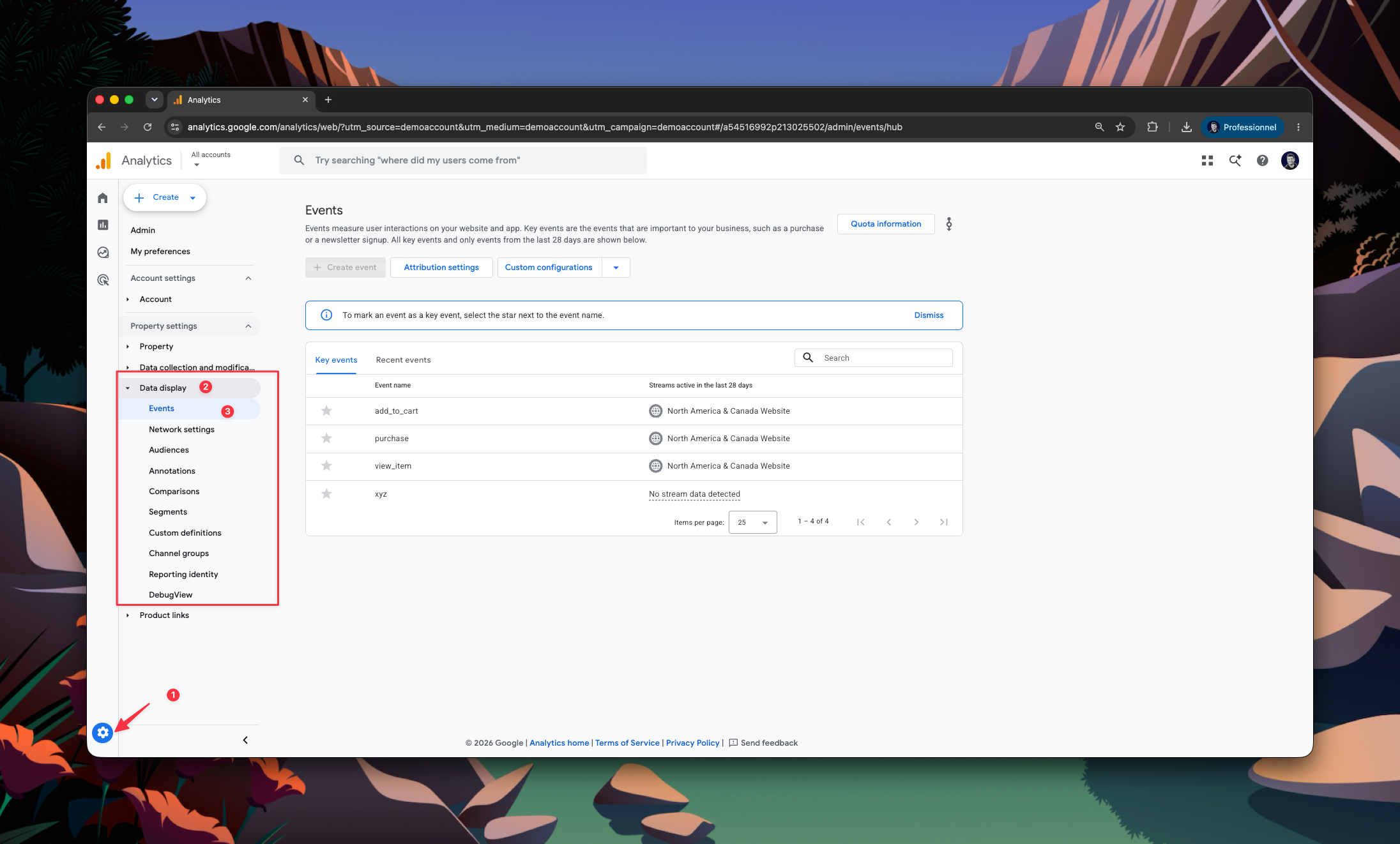
In Admin, under Data display, click Events, then Attribution settings. You need to be a Marketer or above at property level to change anything there. Three separate controls sit on that page, and conflating them is the usual source of confusion.
Break the comparison down by channel
The reporting model and the eligible channels are not the same setting
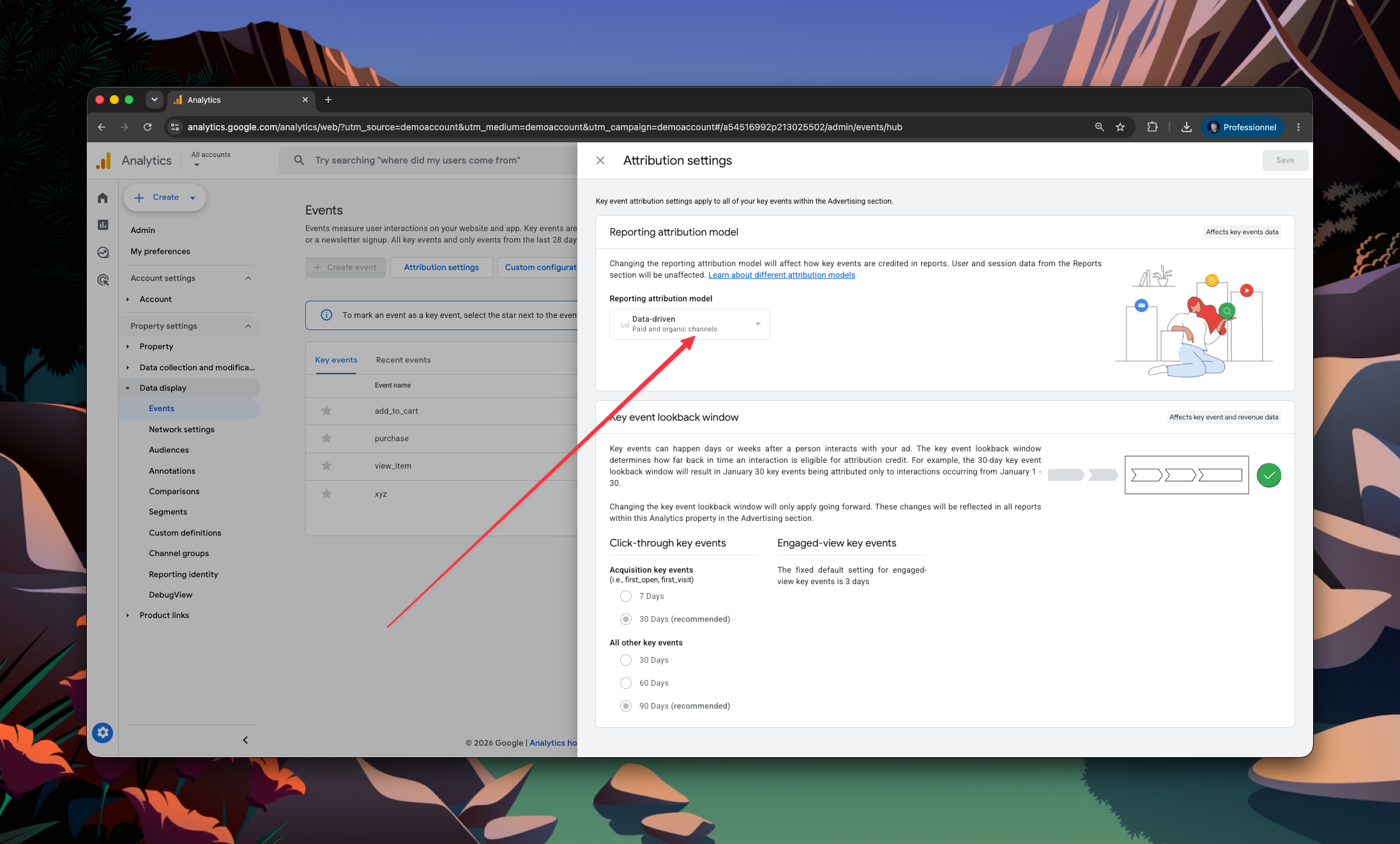
The reporting attribution model decides how credit is divided. Channels that can receive credit decides which channels are allowed to receive any. Set the second one to Google paid channels and your Analytics conversion reports narrow to Google Ads, whatever the model says. Paid and organic channels is the default in Analytics reports, Google paid is the default in Google Ads reports, and app conversions always use Google paid channels regardless. Paid and organic only ever applies to web conversions.
Changing the reporting attribution model applies to historical and future data, with no migration and no waiting period. Yesterday reports read differently the moment you save, which is worth telling anyone who reports off GA4 before you touch it.
Why two GA4 reports disagree
This is the second table above, and it answers the question that sends people to Reddit. Only event-scoped dimensions follow your model setting. Default channel group, Source, Medium and Campaign read whatever model you selected. Session default channel group and First user default channel group do not: they stay on paid and organic last click, which Google also calls last non-direct click, no matter what the property is set to.
So a data-driven property can show fractional credit in one report and whole-number last click credit in another, on the same orders, in the same date range. Neither report is broken. They are answering different questions, and the dimension you picked decided which.
Key event lookback windows
The lookback window decides how far back a touchpoint can sit and still be eligible for credit. Touchpoints older than the window are not in the path at all, so the window decides which journeys exist before the model decides how to score them. Acquisition key events default to 30 days with 7 as the alternative. Everything else, purchase included, defaults to 90 days with 30 or 60 available. For most Shopify brands the 90 day default is the one to leave alone, since considered purchases and returning customer paths regularly run longer than a month. The same window also governs session attribution.
How to compare models without changing your property
You do not have to switch the property setting to find out what switching would do. GA4 has a report for exactly this, and almost nobody writing about attribution models mentions it.
- Click Advertising in the left navigation.
- Under Attribution, open Attribution models.
- Select the key event you care about, usually purchase.
- Compare data-driven against paid and organic last click side by side.
- Break the comparison down by channel, source, medium and campaign.
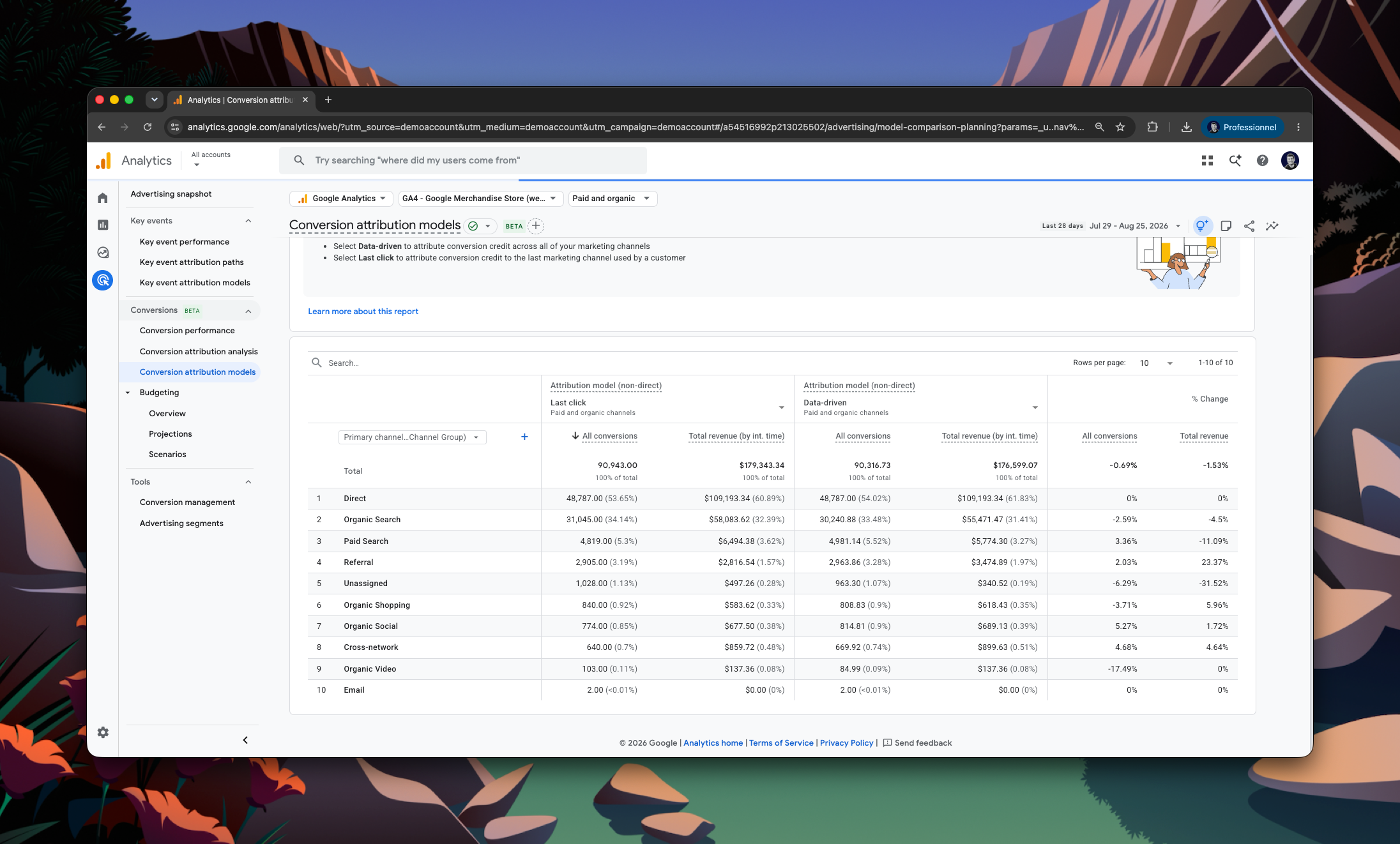
Read four lines first: branded search, email, paid social and organic search. Branded search and email are the two that shrink most when you move off last click, and paid social is the one that usually grows. If the difference between the two models is small on your data, the model was never your problem and you can stop here. If it is large, you now know the size of the decision before you make it for everyone who reads your reports.
The four models GA4 removed
First click, linear, time decay and position based attribution are no longer available in GA4. Google removed them in November 2023, the same change that made data-driven attribution the default.
That is why so much of the writing on this keyword is wrong. Guides published before late 2023, and guides copied from them since, still present nine models and tell you to choose between linear and position based. The picker in your property does not offer them. If you want first click scoring, or a rule that weights the middle of the path a specific way, GA4 no longer has one, and those four models were how most brands used to look past the last click. Their absence is the reason a separate attribution tool started making sense for stores that never previously needed one.
Where GA4 attribution breaks for ecommerce brands
Everything above describes how GA4 divides the credit it holds. The harder question is what never reached GA4 to be divided.
Direct traffic is excluded until it is the only thing left
The direct rule is defensible on its own terms and awkward in practice. Direct is where GA4 puts traffic it cannot classify, and a store with tracking gaps accumulates a large direct bucket. That bucket earns no credit while any classified touchpoint exists in the path, then absorbs the whole sale when nothing else was tracked. A rising direct share is usually a tracking symptom rather than a change in how people find you.
Consent, ad blockers and cross-device buying
GA4 can only credit interactions it recorded. It stops recording them in three common situations, and no model setting affects any of them.
A visitor who declines tracking is not measured, by design and by law. Someone running an ad blocker may never fire the tag. And a shopper who sees an ad on a phone, then buys on a laptop three days later, can arrive as two unrelated people. GA4 fills some of this in with modelled estimates, which is a reasonable choice for a platform serving every kind of website and a frustrating one when you are reconciling a specific week of ad spend against a specific set of orders.
The numbers will not reconcile with Shopify either
Shopify runs its own attribution, and it is not GA4 attribution. Shopify credits each order at checkout from the link data that arrived with the session, on its own rules and its own window. GA4 credits the same order from its conversion path under the model you selected. Neither system reads the other, so a store comparing a Shopify sales-by-channel report against a GA4 acquisition report is comparing two independent measurements of the same week and finding, correctly, that they differ.
The channels GA4 cannot see at all
Some demand produces no measurable interaction anywhere. Connected TV and linear TV. Podcast reads. Direct mail. Word of mouth. A practitioner recommending a product in a consultation. Retail or wholesale discovery that ends in an online reorder.
For plenty of brands these are not edge cases, they are the primary channels. A brand whose strongest source is professional recommendation will see GA4 credit its branded search line for nearly every sale, because branded search is where the customer eventually showed up. The number is not wrong. It is just not the answer to the question that was asked.
Fixable or structural: telling the two apart
GA4 discrepancies fall into two buckets, and the useful diagnostic is knowing which bucket you are in before you spend a quarter on it.
Fixable means setup. Tags firing on the wrong events, misconfigured filters, duplicate triggers, a headless storefront where tracking was custom built and drifted. A capable data team or agency can clear these, and they should, because they are corrupting your reports today.
Structural means the platform. Declined consent, ad blockers, cross-device journeys, and any channel that produces no measurable interaction. No amount of GA4 configuration resolves these, because GA4 is doing what it was designed to do.
The reason to run the diagnostic first is cost. Teams routinely spend months on a GA4 audit trying to close a gap that was never a setup problem, then conclude their data is untrustworthy in general. Separating the two tells you which half of the gap is worth an engineering ticket and which half needs a different input entirely.
What independent attribution adds on top of GA4
Independent attribution does not overrule GA4 judgement about how to split credit. It changes the inputs: how much of the journey gets captured, and how many ways you are allowed to score it.
Consent still governs everything, and where a visitor declines tracking Polar does not track them either. What first-party server-side collection changes is the volume lost for technical rather than legal reasons: ad blockers, and browser restrictions on third-party scripts and cookies. Lifetime ID then stitches sessions and devices to the same person where identifiers allow it, rather than modelling the join. Every ad platform number, the GA4 number and the pixel number sit in the same view, so a disagreement becomes a comparison instead of an argument.
Where GA4 offers three models on a property setting, Polar offers ten on the report itself, from first click and linear through to a Shapley allocation and a platform overlap model that shows how much of one sale two ad platforms are both claiming. Set it to last click and you can compare like for like against GA4, which is the honest starting point for any reconciliation. The full walkthrough of how those models score one ecommerce journey sits in our marketing attribution models guide.
The channels GA4 structurally cannot see can also enter a model, as long as something records them. Offline and impression-led feeds, connected TV, linear TV and direct mail, are matched to the same identity as pixel data. And post-purchase survey answers become real touchpoints in the journey rather than a slide in a monthly deck, which is the only mechanism that catches word of mouth, podcast and professional recommendation at all. Neither is as precise as a click. Both beat a channel reporting zero because nobody was measuring it.
FAQ
How to pick a GA4 attribution model
Start from the question you are answering, not from the model list.
In practice, leave the property on data-driven attribution, which is where GA4 puts it, and use the Attribution models report to see what last click would say before you change anything for everyone else. Expect fractional credit, and expect the weights to move as your channel mix moves. Keep Google paid channels last click for Google Ads questions only, and remember it falls back to paid and organic last click the moment Google is absent from the path.
Then treat the setting as what it is. It decides how GA4 divides the credit it captured, and it has no effect on the consent, cross-device and no-interaction gaps that produced the discrepancy you were chasing. Those need a different input, not a different model. Our guide to data-driven attribution goes deeper on the algorithm itself, and if reconciling GA4, your ad platforms and Shopify is the thing costing you time every month, see how Polar compares to GA4 for ecommerce reporting.
Table of contents
Frequently asked questions