Shopify MCP Server: Connect Your Store to Claude AI (Complete Guide)

TL;DR
AI agents are no longer a future concept for ecommerce they are here, managing inventory, answering customer questions, and generating on-demand reports. The tool making this possible is the Shopify MCP server, a standardized interface that enables AI to interact with your Shopify store data securely. The Model Context Protocol (MCP) is an open standard created by Anthropic that gives AI agents a structured way to connect to external tools and data sources. Think of it as the universal adapter between your Shopify store and the AI tools you want to use.
In this guide, you will learn what MCP servers are, which options exist for Shopify, how to set them up correctly, and what you can accomplish once everything is connected.
What Is an MCP Server? (And Why Shopify Merchants Should Care)
The Model Context Protocol in Plain English
Imagine every device in your house uses a different charging cable. That is the problem MCP solves but for AI connections.
MCP is like USB-C for AI. It is a single, standardized protocol that lets any AI agent connect to any data source or tool. Before MCP, connecting an AI assistant to your Shopify store meant building a custom integration from scratch. Connecting that same AI to your analytics platform, email tool, and inventory system required a separate integration for each. This is the M×N problem: M different AI models multiplied by N different tools equals an explosion of custom code.
MCP collapses that complexity. Each tool builds one MCP server, each AI model builds one MCP client, and the protocol handles communication in between. Any MCP-compatible AI (like Claude) can talk to any MCP-compatible tool (like your Shopify store) without custom engineering.
An MCP server sits on the tool side it exposes your Shopify store data and functionality as a structured interface that AI agents understand. An MCP client sits on the AI side applications like Claude Desktop, Cursor, or Windsurf that speak the MCP protocol and submit requests to these servers.
Why Shopify Adopted MCP
Shopify did not just support MCP they went all in. By the Winter '26 Editions release, Shopify had shipped four official MCP servers across multiple releases starting in Summer '25, making them one of the first major ecommerce platforms to embrace the protocol at this scale.
The reasoning was practical. Shopify's API surface is enormous thousands of endpoints covering products, orders, customers, themes, checkout, and analytics. Building traditional integrations requires deep technical knowledge and significant development time. MCP lets AI agents access that functionality through natural language, giving merchants a dramatically simpler path to their store data.
The four official Shopify MCP servers cover distinct areas:
- Shopify Dev MCP For documentation access and development guidance
- Shopify Storefront MCP For customer-facing AI shopping agents
- Shopify Customer Account MCP For post-purchase customer interactions
- Shopify Checkout MCP Currently in preview for select partners building native applications, handles agentic checkout flows. Designed to work alongside Checkout Kit and branding overrides. Related to (but distinct from) Shopify's Universal Commerce Protocol (UCP), a specification co-developed with industry partners that standardizes how AI agents transact across stores.
This layered approach gives merchants and developers granular control over what AI can access. Documentation and the dev dashboard for all four servers are available at https://shopify.dev.
What MCP Means for Your Day-to-Day Operations
For a non-technical merchant, MCP means you can have real conversations with your store data. Instead of navigating your Shopify admin, clicking through multiple screens, and pulling reports manually, you can ask Claude in plain English:
- "What were my top 10 products by revenue last month?"
- "Update the description for SKU-4421 to mention the new summer colorway."
- "Show me all orders from California that are still unfulfilled."
The MCP server translates your natural language request into the appropriate Shopify API calls, retrieves the data, and returns the answer in a readable format. No code. No spreadsheets. No tab-switching.
For developers, MCP servers let you use AI as a programming partner with full context on your store's schema, theme code, and configuration. You can build Liquid templates, debug webhooks, and scaffold app features with an AI that understands your store's actual structure.
The Complete Map of Shopify MCP Servers
One of the most confusing aspects of the Shopify MCP ecosystem is that there is no single "Shopify MCP server." Multiple servers exist for different purposes, built by different teams, with different capabilities.
Official Shopify MCP Servers
Shopify maintains four official MCP servers, the most reliable options since they are built by Shopify's own engineering team.
1. Shopify Dev MCP
This server provides AI access to Shopify's documentation, API references, and development guidance. It is designed to help developers get contextual answers about Shopify's platform Liquid syntax, GraphQL schema, app development patterns, and API best practices without leaving their AI client.
Important distinction: The Dev MCP server provides documentation and development guidance. It does not connect to your actual store data. To interact with your live store (products, orders, customers), you need either a community Admin API MCP server or the Shopify CLI for authenticated store operations.
- Best for: Developers who want AI-assisted guidance on Shopify's platform
- Access scope: Shopify documentation and API references
- Setup difficulty: Low (5-minute install, no API token required)
- Documentation: https://shopify.dev
2. Shopify Storefront MCP
Designed for building customer-facing AI experiences. This server exposes your product catalog, search functionality, and cart operations through the Storefront API enabling AI shopping agents that can browse products, recommend items, and manage carts on behalf of customers.
- Best for: Brands building AI-powered shopping experiences
- Access scope: Storefront API (read-only catalog, cart operations)
- Setup difficulty: Moderate
- Documentation: https://shopify.dev/docs/storefronts
3. Shopify Customer Account MCP
Handles post-purchase interactions. AI agents can access order history, track shipments, manage returns, and handle account-related queries on behalf of authenticated customers.
- Best for: Customer service automation and authenticated post-purchase experiences
- Access scope: Customer Account API
- Setup difficulty: Moderate to high (requires OAuth 2.0 with PKCE, a custom domain, and Level 2 protected customer data approval)
4. Shopify Checkout / UCP MCP
The newest addition, providing agentic checkout flows that work alongside Shopify's Checkout Kit. Designed to let AI agents take shoppers from product discovery through purchase completion in a single conversational flow. As of early 2026, this server is in preview for select partners building native applications. The Checkout MCP implements parts of the Universal Commerce Protocol (UCP), a spec for standardized AI-to-commerce interactions.
- Best for: Partners building native agentic shopping experiences
- Access scope: Checkout APIs and UCP capabilities
- Setup difficulty: Higher (requires partner preview access)
Third-Party Shopify MCP Servers
Beyond Shopify's official offerings, a growing ecosystem of community-built MCP servers fills gaps the official servers do not cover, most importantly, direct Admin API access for live store operations.
Open-Source GitHub Repositories
Several well-maintained open-source MCP servers wrap the Shopify Admin API and expose it through MCP. These are the servers you need if you want AI to read and write your actual store data (products, orders, customers, inventory):
- shopify-mcp-server (community) A general-purpose Admin API wrapper with broad endpoint coverage. Several forks exist under this name; the most active are amir-bengherbi/shopify-mcp-server (the original), GeLi2001/shopify-mcp, and @ajackus/shopify-mcp-server (70+ tools).
Platform Connectors
Some third-party tools act as MCP aggregators, combining Shopify with other ecommerce tools into a single MCP interface. Remote MCP configurations are common in this category, allowing teams to share a single hosted server rather than running local instances.
The key advantage of third-party servers is flexibility. The trade-off is that you are trusting external code with your Shopify API credentials see the security section later in this article.
Analytics MCP Servers
Standard Shopify MCP servers give AI access to raw store data. But raw data is not business intelligence. If you ask Claude "How are my Facebook ads performing compared to last quarter?" through an Admin API MCP server, it will not have the answer because that data lives in your ad platforms, not in Shopify.
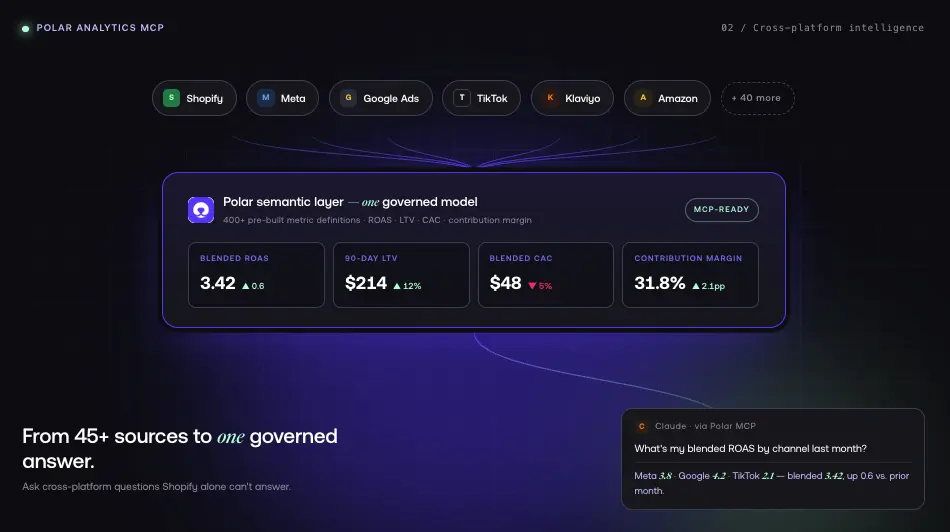
This is where analytics-focused MCP servers come in. Polar Analytics MCP connects Claude to a managed semantic layer built for ecommerce unifying Shopify, Meta, Google Ads, TikTok, Klaviyo, and 45+ other sources into one governed model where ROAS, LTV, CAC, and contribution margin are consistently defined across every query.
Polar's first-party server-side pixel captures conversion signals that iOS and Safari strip from platform pixels, recovering the data foundation that accurate attribution requires. On top of that signal layer, Shapley-based attribution (Full Impact) distributes credit across the full customer journey based on each channel's marginal contribution. Setup takes hours, not quarters.
Because Polar's semantic layer includes 400+ pre-built metric definitions with governed logic for ROAS, LTV, CAC, and contribution margin, Claude returns consistent answers without you needing to define formulas or build dashboards.
How to Set Up a Shopify MCP Server (Step-by-Step)
This section covers four setup paths depending on your use case. Each takes between 5 and 20 minutes.
Prerequisites
Before you begin:
- A Shopify store (any plan works for most servers; some require specific plans)
- An MCP-compatible AI client installed the most common options are Claude Desktop (free, from Anthropic), Cursor, or Windsurf
- Node.js v18 or higher installed on your machine (required for most MCP servers)
If you need store data access (not just docs), you will also need a Shopify API access token generate one from your Shopify admin under Settings > Apps and sales channels > Develop apps. Our Shopify MCP integration guide walks through the token creation process with screenshots.
Option 1 Shopify Dev MCP (Documentation Access, 5 Minutes)
The Shopify Dev MCP server gives Claude access to Shopify's documentation and API references. This is useful for development guidance but does not connect to your live store data.
Step 1: Open your Claude Desktop configuration file.
On macOS: ~/Library/Application Support/Claude/claude_desktop_config.json
On Windows: %APPDATA%\Claude\claude_desktop_config.json
Step 2: Add the Shopify Dev MCP server.
No API token is required this server accesses Shopify's public documentation only.
Step 3: Restart Claude Desktop. You should see a hammer icon in the bottom-left corner indicating MCP tools are available.
Step 4: Test the connection. Ask Claude something like "How do I create a custom section schema in Shopify Liquid?" to verify it can pull from Shopify's docs.
Option 2 Community Admin API MCP (Live Store Access)
To give Claude actual read/write access to your store products, orders, customers, inventory you need a community-built Admin API MCP server. These wrap Shopify's Admin API and expose it through MCP.
Step 1: Choose a community server. Review the options on GitHub. Look for active maintenance, clear documentation, and a reasonable number of stars. Our Shopify MCP server GitHub guide compares the most popular options.
Step 2: Generate a Shopify API access token. In your Shopify admin, go to Settings > Apps and sales channels > Develop apps. Create a new app and configure the Admin API scopes you need (see the security section for guidance on scopes).
Step 3: Configure the server in your MCP client. The exact config depends on the package, but the pattern is consistent:
Replace PACKAGE-NAME with the actual npm package name from the repository you chose.
Step 4: Restart your client and test. Ask Claude "List my 5 most recent orders" to verify it can access your live store data.
Step 5: Verify available tools. Ask Claude "What Shopify tools do you have access to?" to confirm the endpoints you need are available.
Important: Third-party servers may request broader API scopes than necessary. Only grant the permissions the server actually requires. Review the server's documentation and privacy policy before providing credentials.
Option 3 Storefront MCP (Customer-Facing AI)
The Storefront MCP is designed for building AI shopping experiences rather than back-office management.
Step 1: Create a Storefront API access token. In Shopify admin, go to Settings > Apps and sales channels > Develop apps. Create a new app and enable the Storefront API with the scopes you need (typically unauthenticated_read_product_listings, unauthenticated_read_product_inventory, and unauthenticated_write_checkouts for cart and checkout operations).
Note that Shopify is gradually shifting from the Checkout API toward the Cart API, so consult Shopify's current Storefront API documentation to confirm the right scopes for your API version.
Step 2: Configure the MCP server. Consult Shopify's official documentation at https://shopify.dev for the current package name and configuration format, as these may change between releases.
Step 3: Restart your MCP client and test with a customer-facing query like "Search for red running shoes under $100."
This option is ideal for AI shopping agents, conversational product recommendations, or any customer-facing tool that needs to browse your catalog and manage carts.
Option 4 Polar Analytics MCP (Cross-Platform Analytics)
If your primary goal is asking AI about business performance across all your channels not just Shopify Polar Analytics MCP is the most direct path.
Step 1: Ensure your data sources are connected in Polar Analytics. Log in to your Polar account and verify that Shopify, your ad platforms, and any other sources are connected and syncing.
Step 2: Navigate to the MCP setup. Go to https://app.polaranalytics.com/mcp and follow the guided setup flow.
Step 3: Connect Polar Analytics directly from Claude using the Polar MCP connector. Once connected, test with a cross-platform query like "What was my blended ROAS last month, broken down by channel?"
The key difference from a Shopify-only MCP is scope. Polar Analytics MCP connects AI to your unified ecommerce dataset across 45+ sources.
What Can You Actually Do With a Shopify MCP Server?
Connecting an MCP server is the first step. The real value comes from what you do with it.
Store Management
With an Admin API MCP server connected:
- Product updates at scale: "Update all products in the Summer 2026 collection to include the tag 'clearance' and reduce prices by 20%."
- Inventory monitoring: "Which products have fewer than 10 units in stock and had more than 50 sales last month?"
- Collection management: "Create a new automated collection called 'Best Sellers' that includes any product with more than 100 sales in the last 30 days."
- Discount creation: "Set up a 15% discount code called SPRING15 that expires at the end of April and only applies to orders over $75."
Each task would normally require multiple clicks through the Shopify admin. With MCP, they become single-sentence instructions.
Customer Service
The Storefront and Customer Account MCP servers open up service workflows:
- Order lookup: "Find order #4892 and tell me its current shipping status."
- Return processing: "The customer with email jane@example.com wants to return the blue jacket from order #4892. Start the return process."
- Proactive outreach: "List all customers who placed an order more than 14 days ago that still shows as unfulfilled."
These are especially valuable for small teams where one person handles all customer interactions. AI speeds up routine tasks; humans handle complex cases.
Data Analysis and Reporting
This is where the choice of MCP server matters most. Here is what each option can and cannot answer:
If your questions stay within Shopify (orders, products, inventory), an Admin API MCP is sufficient. If your questions span channels attribution, ROAS, LTV, acquisition costs you need Polar Analytics MCP.
Development and Theme Building
With the Shopify Dev MCP (for documentation) combined with an Admin API MCP (for live store access), Claude becomes a context-aware coding partner:
- Theme development: "Review my product template and suggest improvements for mobile conversion rate."
- Liquid debugging: "This Liquid snippet is throwing an error on collection pages. What is wrong?"
- GraphQL queries: "Write a GraphQL query to fetch all products with their inventory levels and variant pricing."
- App scaffolding: "Generate a Shopify app scaffold using Remix that includes a product syncing webhook."
- Schema creation: "Create a new section schema for a testimonials carousel with fields for author name, quote, star rating, and headshot image."
The difference between using Claude with and without MCP for development is context. Without MCP, Claude works only with code you manually paste. With MCP, Claude can browse your theme files, read your schema definitions, and understand your store's configuration before writing a line of code.
Security and Data Privacy
Connecting AI to your store data is powerful, but it comes with real security responsibilities.
API Scopes and Permissions
Every MCP server that accesses live store data needs an API access token, and every token has scopes defining what it can read and write. Follow the principle of least privilege only grant the permissions the server actually needs.
Never grant write_customers or write_orders scope unless you have a specific, well-understood need. These scopes let AI modify sensitive data, and mistakes can be difficult to reverse.
Local vs. Hosted MCP Servers
Local MCP servers run on your machine. Your API token stays on your computer, and data flows directly between your machine and Shopify's API. This is the default for Claude Desktop and the more secure option for most merchants.
Remote (hosted) MCP servers run on someone else's infrastructure. Your API token is stored on their servers. Remote setups are sometimes necessary for team collaboration or always-on automations, but introduce additional trust requirements.
If evaluating a remote solution, ask: Where is my API token stored? Is data transmitted over TLS? What is their data retention policy? Do they have SOC 2 or equivalent certifications? Can I revoke access instantly?
Access Token Best Practices
- Use separate tokens for separate servers. If you run both a store management MCP and an analytics MCP, create distinct tokens for each.
- Rotate tokens regularly. Regenerate quarterly at minimum.
- Never commit tokens to version control. Use environment variables or a secrets manager.
- Monitor API usage. Check Shopify admin's API usage logs periodically. Unexpected spikes could indicate a compromised token.
- Revoke immediately if compromised. Generate a new token and update your MCP configuration.
Shopify MCP Server vs. Traditional API Integrations
When to use traditional integrations: Mission-critical workflows like payment processing, automated fulfillment, and inventory syncing with external systems anything that runs without human oversight and cannot tolerate errors.
When to use MCP: Conversational store interaction, ad-hoc queries, routine task automation, and AI-assisted access to store information. MCP excels at the long tail of operational tasks that are not worth building custom software for.
The best approach for most growing brands is both: traditional integrations for core automated workflows, MCP for everything else.
Conclusion
The Shopify MCP ecosystem has matured rapidly. Between Shopify's four official servers, a growing library of community-built options, and analytics solutions like Polar Analytics MCP, merchants now have real infrastructure for conversational commerce and AI-assisted operations. The setup is straightforward, the security model is sound, and the applications span every part of running a Shopify business.
The key is choosing the right server for your use case. The Dev MCP gives you documentation access for development guidance. Community Admin API servers give you live store access for operations. The Storefront MCP powers customer-facing AI experiences. And Polar Analytics MCP connects Claude to your full ecommerce dataset for cross-platform intelligence.
Start with the option that matches your most pressing need, and expand from there.
FAQ
Table of contents
Frequently asked questions