Why Your Shopify ROAS Never Matches Across Tools (And How to Fix It)

TL;DR
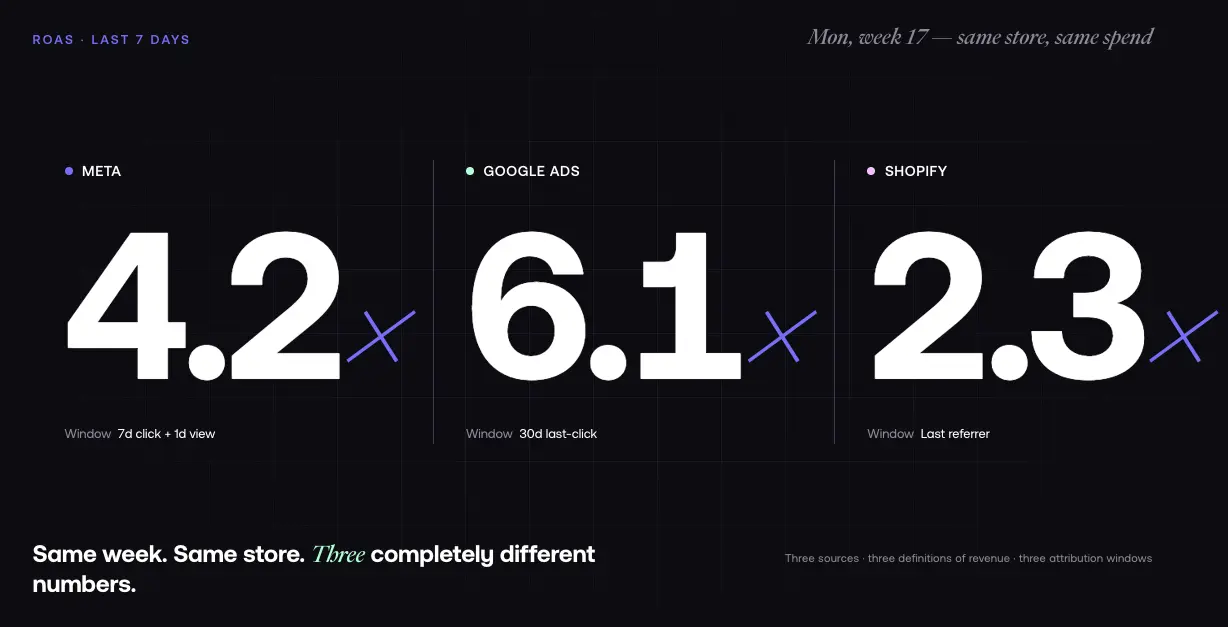
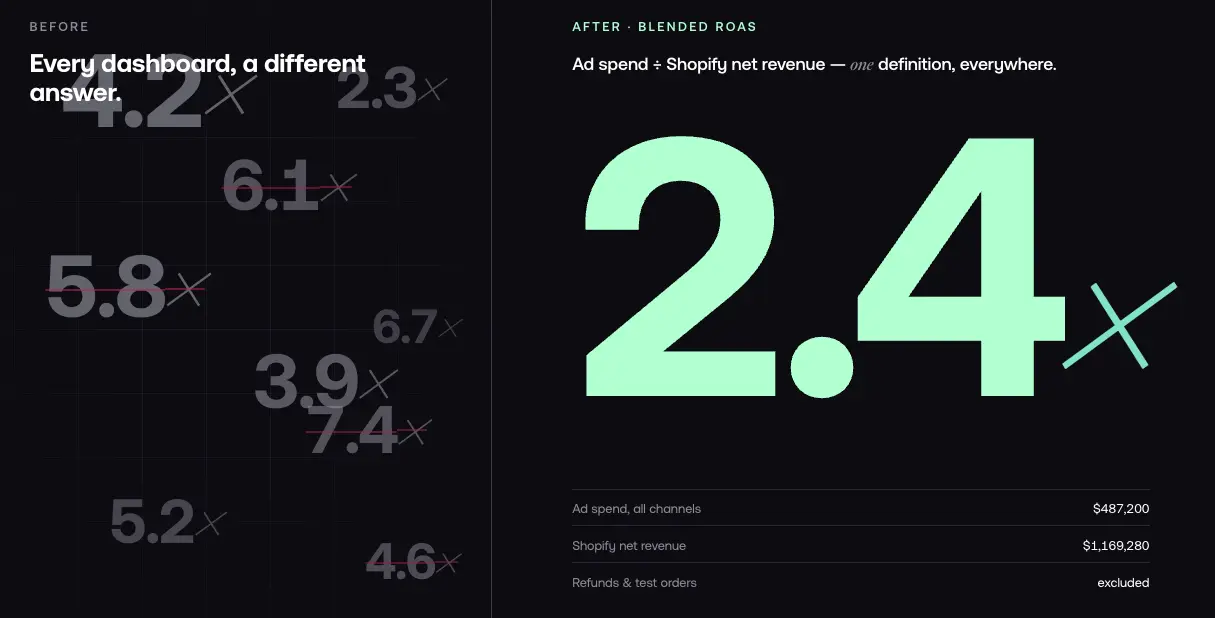
It is Monday morning. You open your dashboard to check how last week's campaigns performed. Meta says your ROAS is 4.2x. Google says 6.1x. Shopify says 2.3x. Same week. Same store. Three completely different realities.
If this feels familiar, you are not alone. The majority of Shopify stores running ads on more than one platform will see meaningful ROAS discrepancies and the gap is getting worse. Your marketing team celebrates results that your finance team cannot reconcile. Your ad spend decisions are based on data that no one fully trusts.
The frustrating truth: this is not a tracking issue you can fix by tweaking a pixel. It is a structural data architecture problem. Meta, Google Ads, and Shopify analytics each operate with different definitions of what a conversion is, when it happened, and who gets credit. Understanding exactly why the mismatch happens and what it costs you is the first step to solving it permanently.
The 5 Reasons Your Shopify ROAS Numbers Never Match
1. Every Platform Defines Revenue Differently
This is the biggest driver of ROAS mismatch, and it starts at the most basic level: what counts as a purchase.
- Shopify gross revenue includes all orders at full price, including those that will later be refunded
- Shopify net revenue subtracts refunds, discounts, and shipping costs
- GA4 transaction revenue only counts purchase events that GA4 can track often a subset of actual orders because of browser-side tracking limitations
- Meta purchase value counts conversions Meta attributes through its own model, including view-through conversions
- Google Ads conversion value uses last-click attribution with its own attribution window and conversion action rules
When you pull data from different sources, you are not comparing like to like. A refund that Meta never saw because it happened three weeks after the purchase event will appear in Shopify but not in your ad platform reporting. A checkout abandonment recovered via email may be claimed by Meta as a view-through conversion and also credited to email as a direct conversion.
2. Attribution Windows Create Systematic Double-Counting
Each platform has its own rules for which click or which view gets credit:
- Meta: 7-day click + 1-day view (includes people who saw an ad but never clicked)
- Google Ads: 30-day click attribution by default
- Shopify analytics: Last-click, attributed to the last referrer session
- TikTok: 28-day click attribution
- LinkedIn: 30-day click + 1-day view attribution
A customer who clicked a Meta ad on Monday, saw a Google search ad on Wednesday, and purchased on Friday appears as a conversion in both platforms. Meta counts the Monday click (within the 7-day window). Google counts the Wednesday click. Both report the purchase. Your total attributed revenue across platforms is systematically inflated.
This is not a bug. It is how each platform's attribution is designed to work.
3. Double-Counting Inflates Platform ROAS by 50–100%
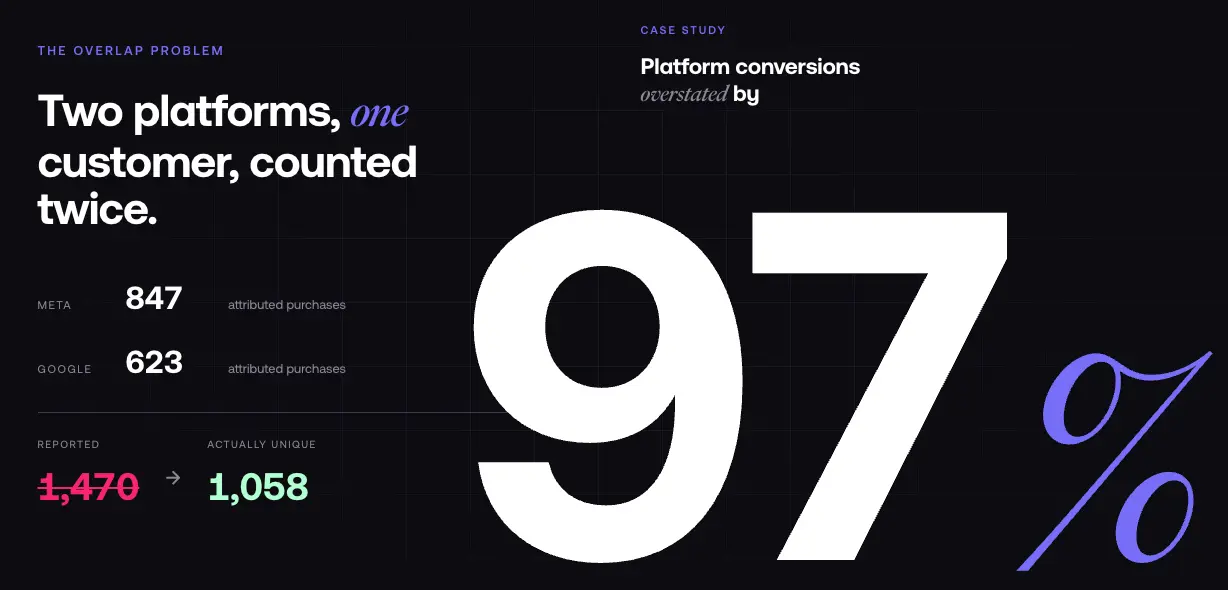
Let us make this concrete. If Meta reports 847 purchase events and Google reports 623 for the same period, the naive total is 1,470 conversions. But if 412 of those involve the same customers counted by both platforms, your actual unique conversions are closer to 1,058.
In practice, we routinely see Meta report 2–3x the conversion value that first-party tracking attributes on a last-click basis. On one account, Meta claimed $156K in attributed revenue for a period where server-side pixel data showed $52K in actual click-driven sales a gap driven almost entirely by view-through attribution and duplicate counting.
The only way to detect duplicate conversions at scale is to join your Shopify order data against ad platform data using a common identifier typically email or order ID. Manual reconciliation works for small stores, but at volume it requires a unified data layer.
4. iOS Privacy and Browser-Side Signal Loss
iOS privacy changes and browser-side restrictions have reduced the conversion data visible to ad platforms. The exact impact varies by your audience's device mix and browsing behavior, but the mechanics are clear.
Apple's App Tracking Transparency (ATT) requires apps to ask permission before tracking users across apps and websites. Current data (Adjust, Q2 2025) shows roughly 60–65% of users decline. Safari's Link Tracking Protection strips fbclid and gclid parameters in certain contexts Private Browsing, Mail, and Messages preventing ad platforms from connecting purchase events to the original ad click.
The pixel fires a purchase event on the thank-you page, but without the click identifier it cannot connect that event to the ad. The conversion still happens in Shopify. Your Shopify data is complete. But Meta's event match quality drops and the attribution is lost.
As cookie policies tighten, this gap will continue to grow. Server-side tracking via the Conversions API (CAPI) is the standard response, but it introduces its own implementation complexity covered in the setup section below.
5. Shopify Pixel Mode and Checkout Tracking Changes
Shopify's default pixel setting changed to "Optimized" mode, which throttles conversion data sent to Meta in certain checkout scenarios. Many store owners saw Meta purchase events drop 20–40% overnight in January 2026.
On top of this, Shopify's checkout is a closed environment. If you are not on Shopify Plus, you cannot add custom scripts to the checkout page, which means GTM and custom tracking scripts cannot fire at checkout completion. Your tracking must rely on Shopify's native pixel integrations or server-side CAPI.
This creates a common gap: a purchase event fires correctly on the order confirmation page for direct checkouts, but post-purchase upsells, subscription renewals, and draft orders may not fire any event at all.
The Real Cost of Mismatched ROAS Tracking
Budget Misallocation at Scale
When you trust inflated platform ROAS, you overspend on channels that appear to perform better than they actually do. Meanwhile, channels that genuinely drive revenue get underfunded because their numbers look worse in comparison.
For a store spending $500K per month on ads, a 50–100% ROAS inflation on one campaign can mean significant misallocated spend over a year. The irony: better-performing campaigns look worse because they generate fewer duplicate conversions. You end up cutting the campaigns that actually work.
The Data Challenges Teams Face Daily
Your marketing team celebrates a 4x ROAS on Meta. Your finance team says contribution margin is shrinking. Everyone is looking at the same business but reporting different numbers.
These challenges kill operational efficiency: someone spends hours every week cross-referencing Meta data with Shopify exports. When no one trusts the data, no one wants to make decisions based on it. Historical data from six months ago cannot be retroactively corrected when you discover a tracking break. A GTM tag fires incorrectly and no one notices for three weeks by the time you find it, the data is gone. And when you cannot trust your purchase data, you cannot reliably evaluate which ad creative is actually generating sales versus which one just has good engagement metrics.
The maximum damage comes not from any single broken conversion action, but from the slow accumulation of small discrepancies that leave every team member slightly unsure which number to trust.
How to Set Up Shopify Conversion Tracking Correctly
Step 1: Establish Shopify as Your Source of Truth
Before you fix anything in Meta or Google, lock down your Shopify data as the authoritative source of purchase data. Net revenue from Shopify, after refunds, excluding test orders this is your baseline.
Every other platform's performance is measured against this number. Your ROAS framework should start here: total ad spend divided by Shopify net revenue, not by any platform's attributed revenue.
Step 2: Implement Pixel and CAPI Together
The best practice for Meta tracking today is to run the pixel and CAPI in parallel browser-side and server-side together. The browser-side pixel captures events in real time when cookies and browser signals are available. Server-side CAPI sends purchase events directly from Shopify to Meta's servers, bypassing browser-based signal loss.
Running both with deduplication enabled using the event ID field gives Meta maximum signal without inflating event count.
To implement:
- Go to Meta Events Manager > Your pixel
- Enable the Conversions API integration via the Shopify app (or a custom server-side integration)
- Set the event match quality target to 7.0 or higher below 6.0 indicates significant matching failures
- Verify purchase event deduplication by checking for duplicates in the Events Manager diagnostic view
Also confirm that AddToCart events are firing correctly. A broken cart event is often the first sign of a funnel tracking gap your retargeting campaigns miss a critical signal and purchase event quality degrades downstream.
Step 3: Switch Shopify Pixel to Always-On Mode
In your Shopify admin, go to Sales channels > Meta and switch from Optimized to Always-On. This ensures Shopify sends all available conversion data to Meta. This single step can recover a significant share of purchase events that were being silently throttled.
Step 4: Audit Your Google Tag Manager Setup
If you use GTM on your Shopify theme, run a complete audit of your tag firing rules. Common issues:
- Purchase event tags firing on page view instead of order confirmation
- Tags that do not fire during accelerated checkout (Shop Pay, Apple Pay)
- Missing transaction_id deduplication in your Google Ads conversion action this is the parameter that prevents the same order from being counted twice
- GTM scripts blocked by a consent management tool that is not properly configured
Use Google Tag Assistant to verify that your purchase event fires once and only once per completed checkout.
Step 5: Align Attribution Windows and Revenue Definitions
Once your event tracking is clean, align your reporting:
- Use the same attribution window for comparison (7-day click is a practical standard)
- Report in net sales (after refunds and discounts) across all platforms
- Set a consistent currency in every platform account
- Use the same time zone in Shopify, Meta, Google, and any data warehouse you query
This will not make the numbers identical they never will be but it will reduce variance from data definition mismatches to something manageable (typically 5–15%).
Pro Tips: Diagnosing a ROAS Mismatch
Check Your Event Match Quality Score First
The fastest way to diagnose Meta attribution problems is to check the event match quality score for your purchase event in Meta Events Manager. A score below 6.0 means Meta cannot reliably match events to customer profiles. The most common causes: missing or poorly hashed email in the pixel payload, missing phone number data, or a checkout flow that strips user data before the purchase event fires.
Improving event match quality often has more direct impact on Meta attribution accuracy than any other single change.
Identify Missing Conversions with Historical Data
Pull 90 days of data from both Shopify and Meta. Build a comparison: total Shopify net revenue by week vs. total Meta-attributed purchase value by week. The ratio should be relatively stable. A spike in the Meta-to-Shopify ratio suggests broken deduplication or a conversion action that fired incorrectly. A drop suggests a tracking break.
This manual audit is the fastest way to identify when something broke and to quantify the real-world impact.
Look for Broken Checkout Events in Real Time
Complete a real test purchase through your store. Check in real time:
- Does the pixel fire a Purchase event on the confirmation page?
- Does the GTM dataLayer receive a purchase event with the correct order value?
- Does Shopify's order count update immediately in the admin?
- Does the conversion action appear in Google Ads within a few hours?
If any of these are broken, you have a systematic underreporting problem actively skewing your campaign optimization.
The Structural Fix: A Unified Data Layer
What Is a Semantic Layer for Ecommerce?
A semantic layer is a translation layer between your data sources and your analytics tools. It defines every metric in one place, with one definition, and serves that consistent definition to every tool that queries it.
Instead of wondering which revenue number to trust, you define it once: net revenue from Shopify, after refunds, excluding test orders, for the selected date range. Every downstream tool dashboards, client reports, business intelligence pulls from the same definition.
How It Works in Practice
A semantic layer pulls raw data from Shopify, Meta, Google Ads, TikTok, GA4, and any other platform you use. It normalizes each platform's data into unified metric definitions:
- Revenue means the same thing everywhere: Shopify net sales, not platform-attributed purchase value
- ROAS is calculated from unified ad spend divided by unified Shopify revenue a true blended ROAS
- Attribution is handled consistently across all channels, with cross-platform deduplication built in
- Multi-touch analysis becomes possible when all events are stored in a unified data model
What Changes When You Have One Number
Teams that implement unified measurement report three consistent improvements.
Faster decisions. No one spends time reconciling Meta vs. Shopify vs. Google Ads reports. The number is the number.
Aligned teams. Marketing and finance agree on performance because they are looking at the same data. The conversation moves from "which number is right" to "what do we do about it."
Confident scaling. When you know which campaigns actually drive Shopify sales not just which campaigns claim the most platform-attributed conversions you can scale spend with real confidence.
Polar Analytics was built to fix this problem at its source. Its managed semantic layer unifies Shopify, Meta, Google, TikTok, Klaviyo and 40+ other ecommerce sources under a single set of governed metric definitions so net revenue, spend, and ROAS mean the same thing whether you are looking at a dashboard, a board deck, or asking a question in natural language.
To close the gap left by iOS and Safari stripping click identifiers, Polar closes the signal gap with two distinct layers.
First, a first-party server-side pixel installed directly on your Shopify store captures every customer event including those invisible to ad platforms because of iOS restrictions, Safari cookie limits, or ad blockers.
Second, a Shapley-based attribution model takes that complete event data and distributes credit across every touchpoint in the customer journey, replacing the last-click or platform-claimed logic that causes double-counting in the first place.
Setup plugs into an existing Shopify store in a few hours.
FAQ
Table of contents
Frequently asked questions