How to Build an AI Agent That Reviews Your Meta Ads Every Day

TL;DR
- A Meta ads AI agent is a scheduled prompt that reads your ad and store data every morning, compares yesterday with the trailing 7 days, and recommends which ad sets to pause, hold or scale.
- Your team reviews the list and approves any budget change. The agent does not touch spend.
- You need three things: a data source that holds Meta Ads and Shopify data together, an AI model that can run on a schedule, and a place for the output (Slack or Notion).
- Ad sets still in learning get no verdict, and every verdict is based on 7-day numbers, because a single day of Meta data is too noisy to act on.
- Judge Meta against Shopify revenue and blended numbers, and show Meta-reported ROAS only as a reference.
Last updated: October 22, 2026. Written by the Polar Analytics team. Polar is an AI data platform for commerce, and this guide uses Polar as the data source. We ran every step below on a real brand's account in read-only mode. The numbers shown are changed; the behavior is not.
The short answer
A Meta ads AI agent is a scheduled prompt that reads your ad and store data every morning, compares yesterday with the trailing 7 days, applies the targets you set, and recommends which ad sets to pause, hold or scale. Your team reviews the list and approves any budget change. The agent does not touch spend.
To build one you need three things:
- A data source that holds Meta Ads and Shopify data together, with metrics like MER, blended ROAS and CAC already defined. Polar does this through the Polar MCP.
- An AI model that can run on a schedule, such as Claude with the Polar connector enabled.
- A place for the output: a Slack channel or a Notion task database.
The setup is the same one we use in the AI Ecommerce Team Playbook: connect the data, write the rules, test the prompt by hand once, then schedule it.
What the agent does every morning
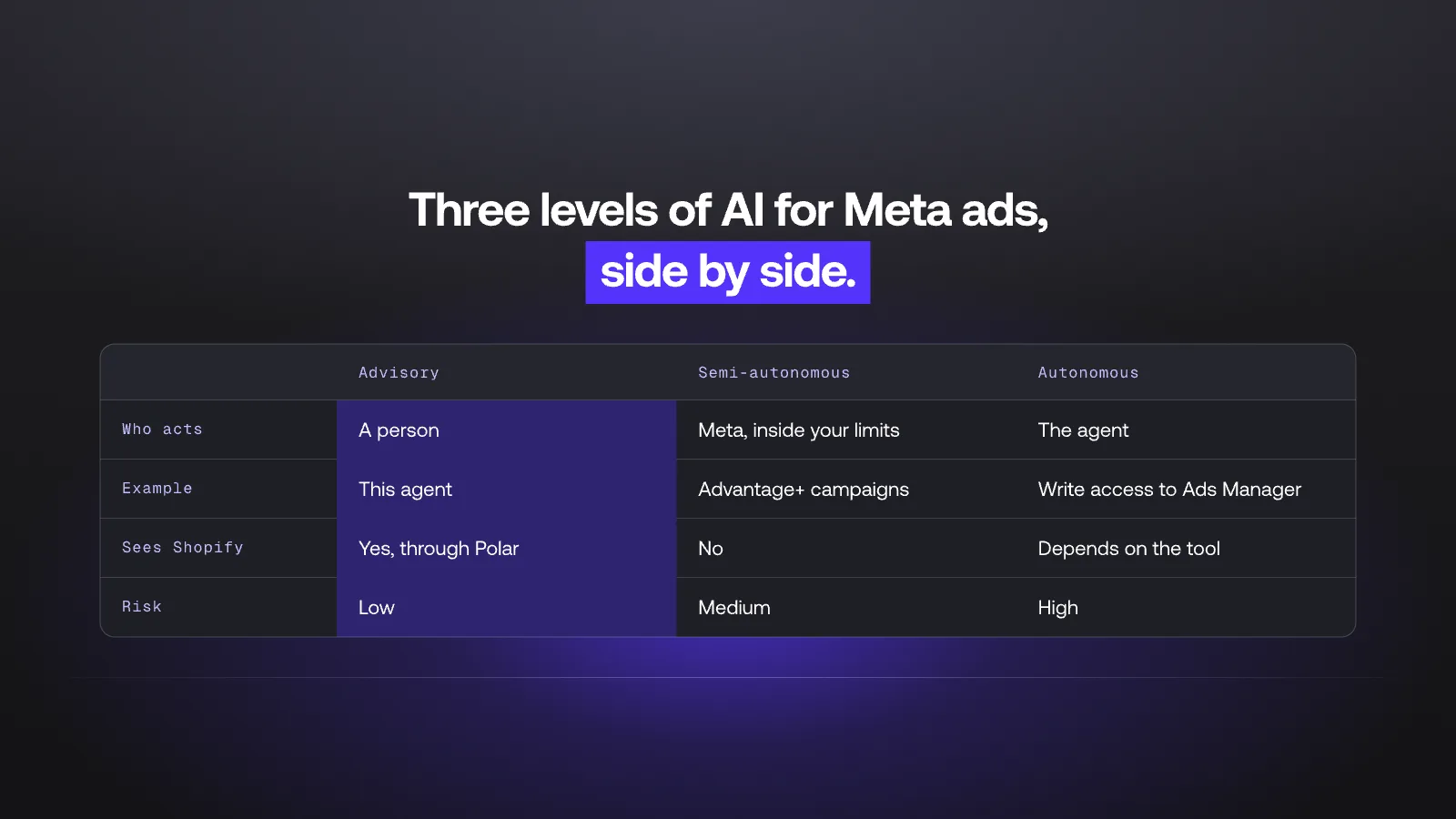
Each morning the agent checks that the data is complete, pulls yesterday's numbers next to the last 7 days, applies your rules, and posts a short report. This is the structure of a real run, with the brand and numbers changed.

Three things to notice:
- The agent checked the data before judging it. If spend or orders are missing, it stops.
- An ad set that would have been paused on CPA alone got HOLD, because it was in Meta's learning phase.
- Nothing changes in Ads Manager. The list waits for a human.
What we saw when we ran it
We ran the prompt from Step 3 in Claude with the Polar MCP on a brand's live workspace, read-only, on October 22, 2026. Four things stood out.
- It checks before it judges. The agent confirmed Meta and Shopify were synced, noticed the ad account bills in euros, and applied the targets in euros on its own.
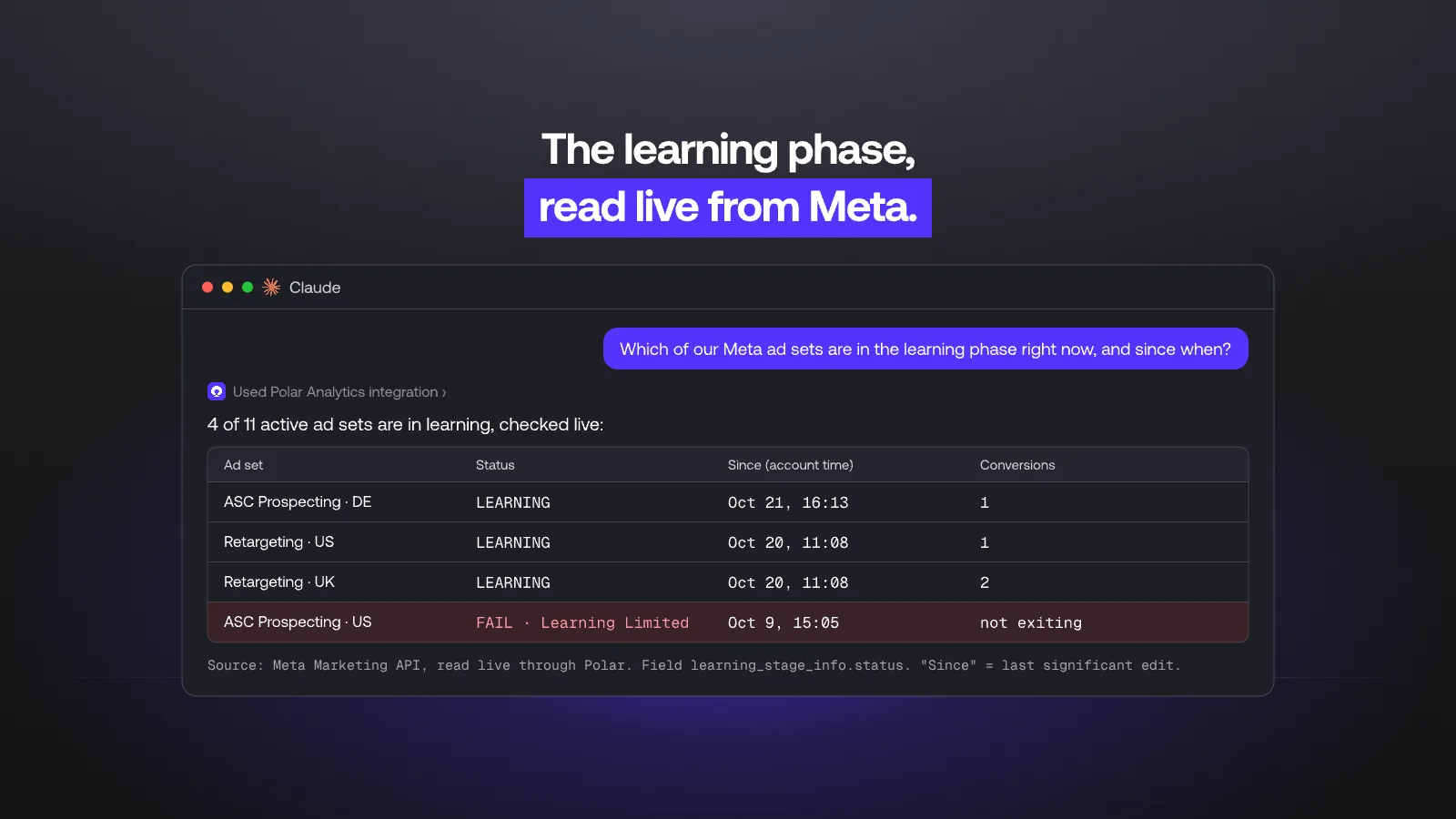
- It reads the learning phase live. Polar's warehouse does not store Meta's learning status, so the agent read it from the Meta Marketing API through Polar's connection. The field is learning_stage_info.status, which returns LEARNING, SUCCESS or FAIL (Learning Limited). Meta gives no "entered learning" date, so the agent used the time of the last significant edit, in the ad account's time zone.
- It spots patterns a person skims past. Three retargeting ad sets had re-entered learning within two minutes of each other. The agent flagged it as one batch edit.
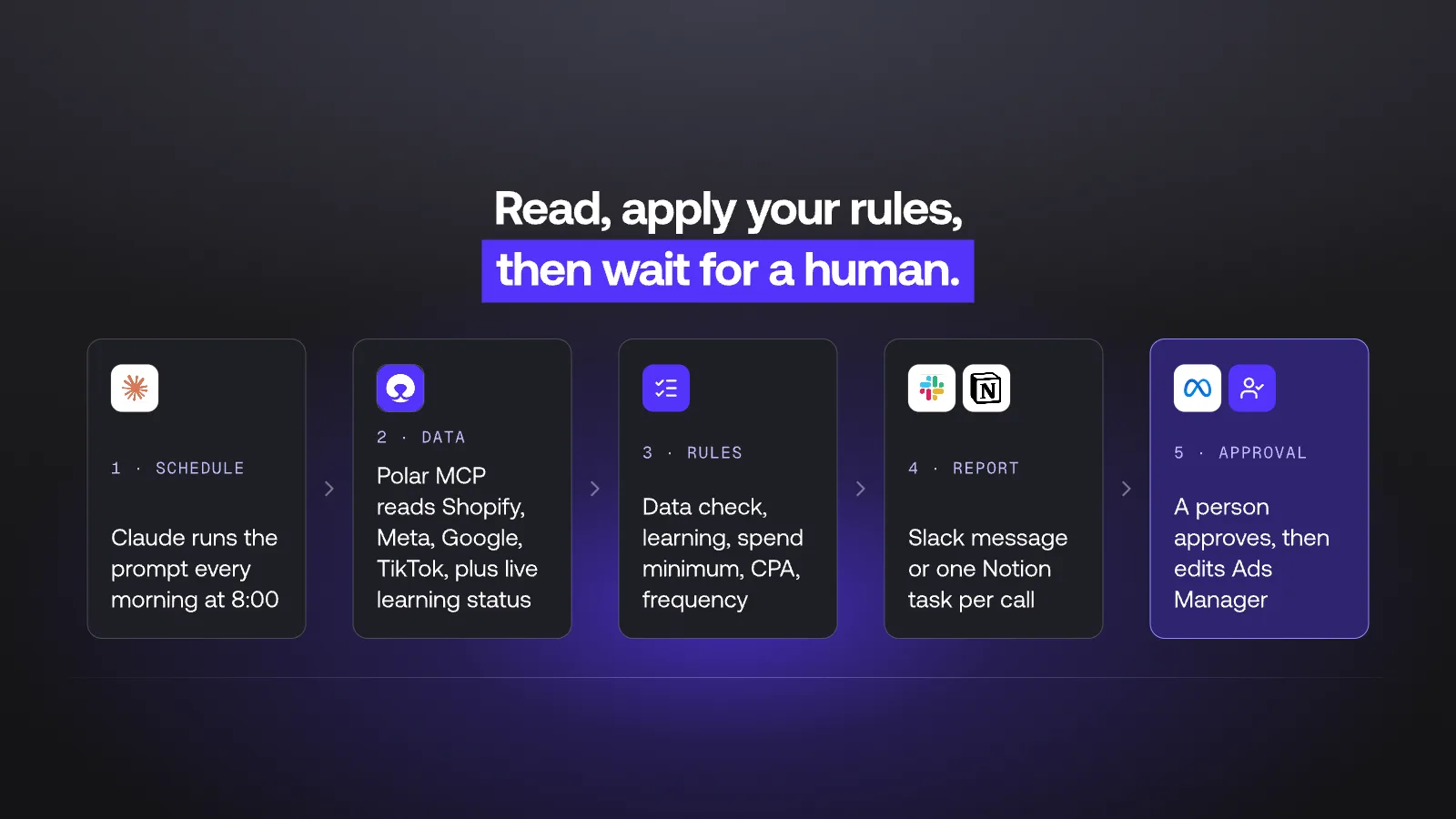
- Meta and Shopify disagree most on retargeting. Comparing Meta-reported purchases with the Shopify orders Polar attributes to Meta (click-based, 30-day lookback), Polar matched about half of what Meta reported. Prospecting campaigns lined up closely. Retargeting carried most of the gap, which is typical of view-through and cross-device credit.
Why the data source matters
The quality of the agent depends on what it reads. There are two common setups.
Meta-only data. The agent reads Ads Manager through the Meta API or Meta's own ads MCP. It sees spend, impressions, CTR, CPM, frequency, learning status and Meta-reported purchases. It does not see Shopify revenue, margin, returns or what Google and TikTok spent the same day. Every ROAS it calculates uses Meta's own attribution, which credits Meta for conversions it influenced within its window. Other channels often claim some of the same orders.
Store plus all ad channels. The agent reads Shopify orders next to spend from every paid channel. It can compute MER (store revenue divided by total ad spend) and blended CAC, compare Meta-reported conversions with orders that actually landed in Shopify, and judge Meta against the business target, not against Meta's own reporting.
For a brand spending across Meta, Google and TikTok, the second setup gives defensible answers. In our test, a retargeting campaign showed a Meta ROAS above 5 and a store-attributed ROAS under 1.
Polar connects Shopify, Meta, Google, TikTok, Klaviyo, Amazon and the rest of its 1,000+ one-click connectors into a managed warehouse, with metrics like blended ROAS, MER, CAC and contribution margin defined once. When Claude asks Polar for "CPA", it gets your CPA, not a guess. When a question needs a Meta field the warehouse does not store, such as learning status, Polar reads it live from Meta and says so.
Bring your own attribution model
Meta grades its own homework. Its ROAS uses Meta's attribution window, so a review built on Meta data alone can only check Meta against itself. The agent can go one step further and check Meta against the attribution source you trust.
Through the Polar MCP, it can read three sources:
- Your current attribution tool. If you run Northbeam, Polar can import that data so the agent compares both models side by side. If you move from Triple Whale, Polar migrates your history.
- The Polar Pixel. Polar runs its own first-party pixel with 10+ attribution models, so the agent judges Meta on the model you pick, not on the one Meta reports.
- Incrementality tests. With Causal Lift, Polar runs incrementality tests that measure what your Meta campaigns add beyond the sales you would have made anyway.
In the daily review, this becomes a rule: when Meta-reported ROAS and your chosen model disagree, the agent flags it and bases the verdict on your model, not on Meta's.
Can't Meta's own AI do this?
Partly. Meta already runs a lot of automation, and it helps to know which layer does what.
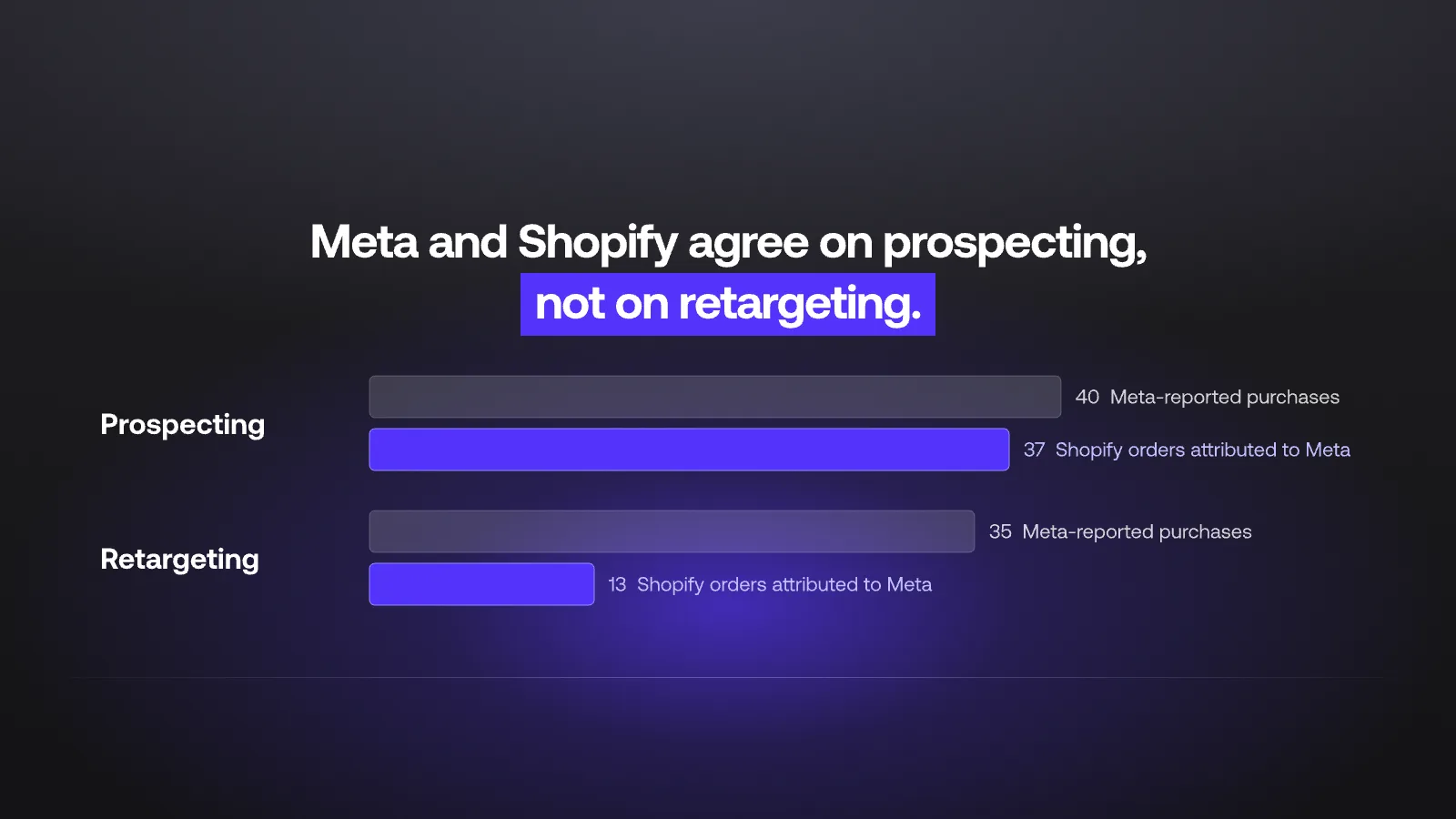
| Level | What it does | Meta's own tools | This agent |
|---|---|---|---|
| Advisory | Reads data and recommends; a person acts | Meta AI business assistant in Ads Manager | Yes: recommends, a person approves |
| Semi-autonomous | Acts inside limits you set | Advantage+ campaigns (targeting, bidding, placements) | No |
| Autonomous | Creates, edits and pauses on its own | Agents with write access through the Marketing API or Meta's ads MCP | No, by design |
Meta's tools see Meta data only. They optimize delivery inside Meta and judge Meta on Meta's attribution. The agent in this guide sits one level above: it reads Meta next to Shopify and your other channels, and it tells you whether Meta is working for the business. Keep Advantage+ for delivery. Use the agent to decide where the budget goes.
What you need
| Account | Why | Notes |
|---|---|---|
| Polar Analytics | Holds Shopify and ad data, exposes it through the Polar MCP | Connect Shopify, Meta Ads, and every other paid channel you run |
| Claude (paid plan) | Runs the analysis and the daily schedule | Scheduled tasks are on all paid plans. Polar is an official Claude connector. ChatGPT and other MCP clients also work for the analysis |
| Slack or Notion | Receives the report and the approval tasks | Notion suits a task-by-task review flow |
| Meta Ads access | Only for the person who executes approved changes | The agent itself does not need write access to Ads Manager |
Step by step
Step 1: Connect Shopify and your ad accounts
In Polar, connect Shopify and Meta Ads first, then Google Ads, TikTok Ads and any other channel with meaningful spend. The agent can only compute MER and blended CAC if all paid spend is in one place.
Then add the Polar connector in Claude from the Claude connector directory and authorize it with your Polar workspace. Ask one test question, for example "What was our Meta spend and Shopify net sales yesterday?", and check the answer against Ads Manager and Shopify.
Step 2: Define your targets and rules
Write down the numbers the agent will judge against, and agree on them with whoever owns the budget.
- Efficiency target: target CPA, or target MER for the account. Pick the one your finance team already uses.
- Hard ceiling: the CPA above which an ad set is a pause candidate.
- Minimum spend before judging: 2x your target CPA over 7 days. Do not copy a fixed number from a template: in our test, a generic $900 minimum left almost every ad set unjudged.
- Learning phase rule: ad sets still in learning get no verdict. Learning Limited gets a structure flag, not a CPA verdict.
- Frequency cap: for prospecting, a level above which fatigue is likely.
- Scale step: the largest budget increase the agent may suggest in one day.
- Data-quality checks: what makes the agent stop and report instead of recommend (missing spend, Shopify orders not synced, a tracking gap).
Step 3: Write the prompt
This prompt is adapted from the Facebook Ads agent in the AI Ecommerce Team Playbook. It runs daily and compares yesterday with the trailing 7 days, but bases every verdict on 7-day numbers, because a single day of Meta data is too noisy to act on.
Replace the values in brackets with your own.
Use the Polar Analytics MCP for all data (Polar covers Shopify, Meta,
Google, TikTok, Klaviyo, Amazon, GA4). Don't call other skills.

You are my Meta (Facebook/Instagram) Ads reviewer. Run a daily review
of Meta Ads for YESTERDAY compared with the TRAILING 7 DAYS
(the 7 days ending yesterday).

MY TARGETS AND RULES
- Target CPA: [$45]. Pause candidate if 7-day CPA is above [$60].
- Account MER target: [3.5] (Shopify net sales / total ad spend,
  all channels).
- Minimum spend before judging an ad set: [2x target CPA] over 7 days.
- Read each ad set's learning status live (learning_stage_info.status).
  LEARNING or launched in the last [5] days: HOLD and say why.
  FAIL (Learning Limited): HOLD and flag for a structure review.
- Prospecting frequency cap: [3.0] over 7 days.
- Largest budget increase to suggest: [+20%] per ad set per day.
- Use Polar-attributed conversions and Shopify revenue for decisions.
  Show Meta-reported ROAS next to it when they differ by more than 25%.
  Judge retargeting on the Polar figure only.
- If the ad account currency differs from my targets, say so and apply
  the targets in the account currency.

STEP 0: DATA CHECK
Confirm Meta spend and Shopify orders are synced through yesterday.
If either is missing or yesterday's Meta spend is 0, stop, report the
gap in one line and make no recommendations.

STEP 1: ACCOUNT SNAPSHOT (table)
Yesterday vs trailing 7-day daily average: Meta spend, purchases,
CPA, ROAS (Polar), ROAS (Meta-reported), CPM, CTR, frequency,
blended MER (all channels).

STEP 2: AD SET VERDICTS
For each active ad set with spend in the last 7 days, assign one of:
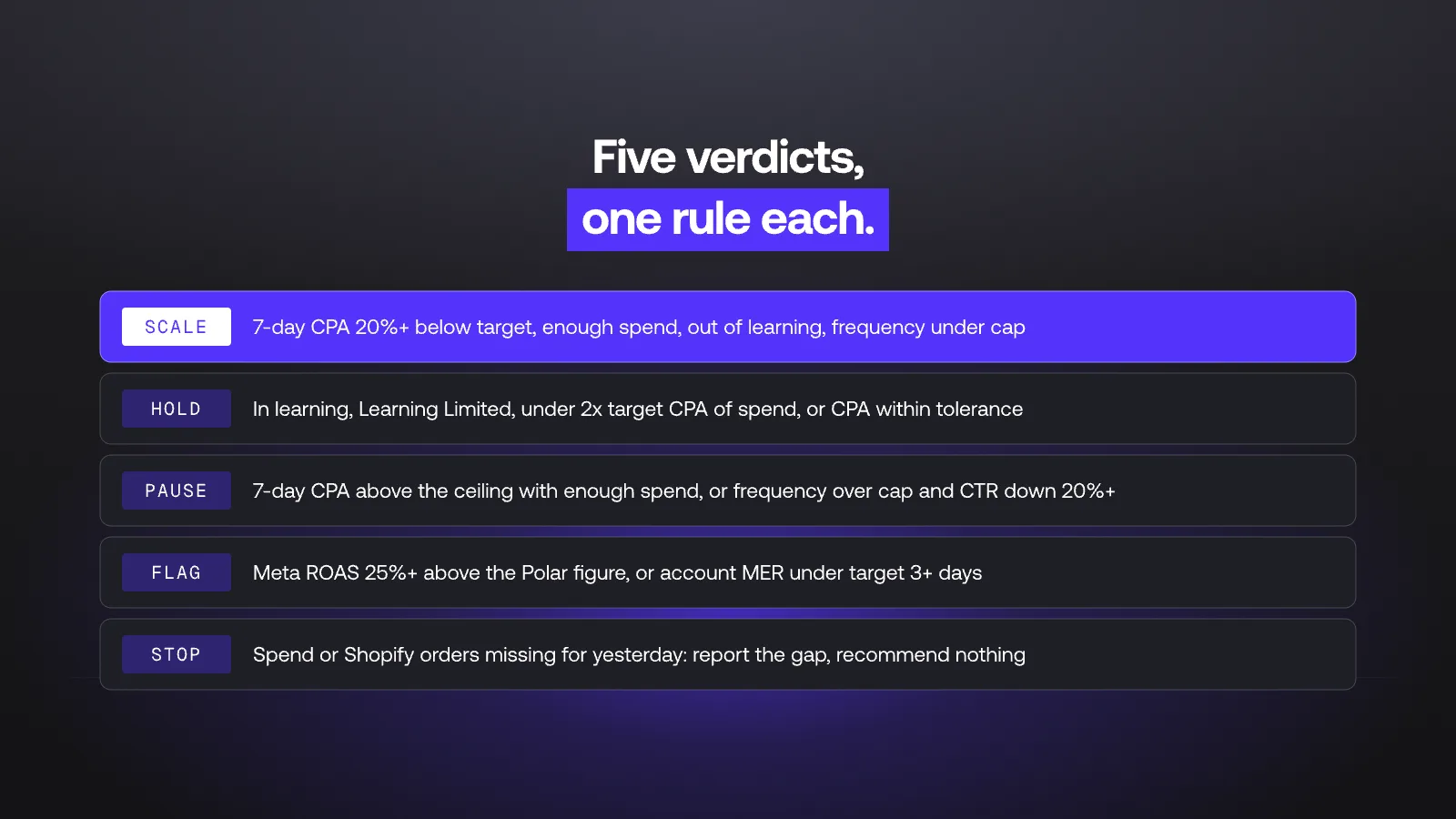
- SCALE: 7-day CPA at least 20% below target, spend above minimum,
  not in learning, frequency under cap.
- PAUSE: 7-day CPA above the pause threshold with spend above
  minimum, OR frequency above cap with CTR down 20%+ vs the prior
  7 days.
- HOLD: everything else, including learning phase and low spend.
For each SCALE and PAUSE, give the 7-day spend, CPA, ROAS (Polar and
Meta-reported), frequency, and a one-line reason.

STEP 3: OUTPUT
Write a report under 250 words: data check, snapshot, then
recommendations ordered by spend. Only list HOLD ad sets if they
spent more than 10% of the account. Never say a change has been made.
Every recommendation needs human approval.

Then post the report to Slack channel [#meta-daily] OR create one task
per SCALE or PAUSE recommendation in the Notion database at
[YOUR_NOTION_DATABASE_URL] with: Name, Priority (High/Medium/Low),
Owner ("Ads"), Action Type (Scale/Pause), Channel ("Meta"),
AI Agent ("Meta Daily Review"), Impact Metric, Review Notes (ad set
names and numbers), and Status "Needs Human Review".
Step 4: Test it once by hand
Paste the prompt into a normal Claude chat before you schedule anything. For the test, replace the last paragraph with "Do not post anywhere. Just answer in this chat." Then check three things:
- Numbers match. Spot-check spend and purchases for two ad sets against Ads Manager, and net sales against Shopify. Small gaps from attribution are expected. Large gaps mean a connection or definition problem.
- Rules are applied. Find an ad set you know is in learning. It should be HOLD.
- Output is short. If the report runs long, tighten Step 3 of the prompt.
Run it on three or four past days if you can. This shows how often the agent would have recommended a change, and whether your thresholds are too tight or too loose.
Step 5: Schedule it daily
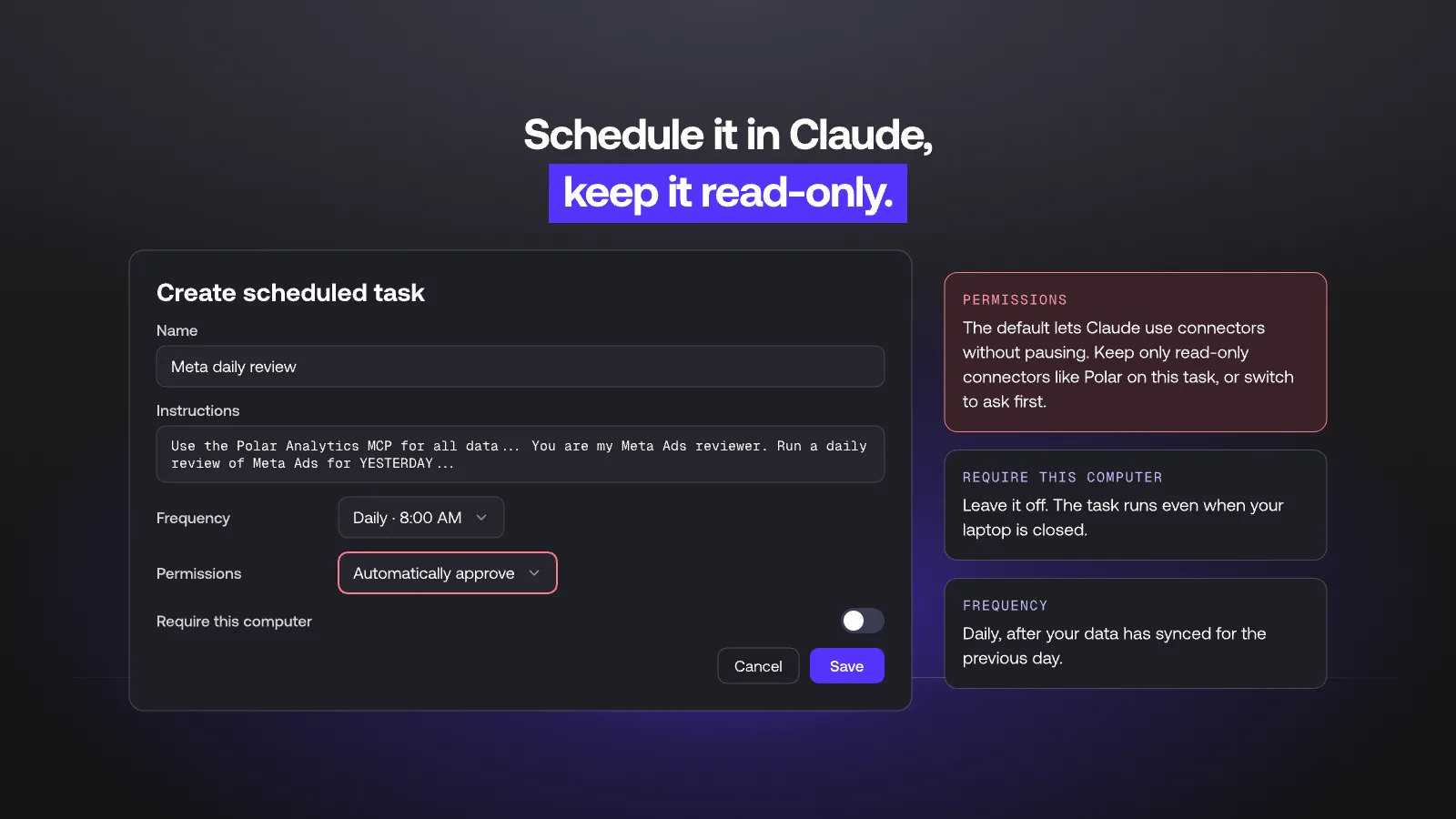
In Claude, open Scheduled in the left sidebar, then click New task. In "Create scheduled task":
- Name: "Meta daily review".
- Instructions: paste the prompt from Step 3.
- Frequency: daily, at a time after your data has synced for the previous day, so "yesterday" is complete. Some teams pick weekdays only and read Monday's report with the weekend included.
- Permissions: the default is "Automatically approve", which lets Claude use connectors without pausing. Keep only read-only connectors such as Polar on this task. If a connector with write access, like Meta's ads MCP, is enabled in the same account, change this setting so Claude asks first.
- Require this computer: leave it off so the task runs even when your laptop is closed.
Click Save. If one run fails, the next morning's run starts fresh.
Step 6: Route the output to Slack or Notion
Pick one place and stick to it.
- Slack works when one person owns Meta and reads the report with their coffee. Post to a dedicated channel such as #meta-daily, not a general one.
- Notion works when several people share the budget or an agency executes the changes. Each recommendation becomes a task with the numbers in Review Notes and the status "Needs Human Review". This is the setup the playbook uses.
Step 7: Review and approve
The agent recommends. Your team decides.
- One named owner reviews the list every morning.
- Each recommendation is approved, rejected or deferred, with a one-line reason.
- Only approved changes are made in Ads Manager, by a person.
- Once a week, compare what was approved with what happened next. Rejected recommendations are the best input for tightening the rules.
Keep three things separate when you report on the agent: what it recommended, what your team changed, and what the measured outcome was. They are different claims.
Decision rules to start with
These are starting points, not benchmarks. Replace every number with your own targets.
| Situation | Rule | Verdict |
|---|---|---|
| Ad set in learning or launched in the last 5 days | No judgment until it exits learning | 🟡 HOLD |
| Learning Limited (status FAIL) | Not enough signal at this budget and audience | 🟡 HOLD, flag structure |
| 7-day spend below 2x target CPA | Not enough conversions to judge | 🟡 HOLD |
| 7-day CPA at least 20% below target, frequency under cap | Room to grow | 🟢 SCALE, up to +20% |
| 7-day CPA between target and pause threshold | Within tolerance | 🟡 HOLD |
| 7-day CPA above pause threshold, spend above minimum | Consistently over target | 🔴 PAUSE |
| Frequency above cap and CTR down 20%+ vs prior 7 days | Likely creative fatigue | 🔴 PAUSE or refresh creative |
| Meta-reported ROAS 25%+ above Polar-attributed ROAS | Attribution gap | 🟡 Flag, decide on the Polar figure |
| Retargeting campaign | View-through credit inflates Meta's numbers | 🟡 Judge on the Polar figure only |
| Account MER below target for 3+ days | Account-level efficiency problem | 🟡 Flag, no new SCALE calls |
| Spend or orders missing for yesterday | Data-quality issue | 🔴 Stop, report the gap |
How to know the agent is working
Score it for four weeks before you trust it with anything more.
| Week | What to check | Good sign |
|---|---|---|
| 1 | Do the numbers match Ads Manager and Shopify? | Small, explained gaps only |
| 2 | Does it hold ad sets in learning and stop on missing data? | No verdict on a learning ad set |
| 3 | What share of recommendations does the owner approve? | Most approved, rejections have a clear reason |
| 4 | What happened after approved changes? | Approved SCALE calls held their CPA |
Each rejection is a rule to add or tighten. Each approval that worked is evidence you can show the budget owner.
Common mistakes
Judging ad sets in the learning phase. Meta's delivery system is still exploring during learning, and results are less stable. Cutting an ad set there often kills it before a fair test. In our run, the only ad set above the spend minimum was in learning, and its CPA alone would have triggered a pause.
Acting on too little spend. Three conversions is not a trend. Set a minimum spend before any verdict, and base decisions on 7-day windows even though the report runs daily.
Using platform ROAS as the target. Meta-reported ROAS uses Meta's attribution window and can count orders other channels also claim. Judge Meta against Shopify revenue and blended numbers, and show the platform figure only as a reference.
Leaving "Automatically approve" on with a write connector. A scheduled task with permission to use a connector that can edit campaigns can change spend without anyone looking. Keep the task read-only.
Reacting to one bad day. A daily review is for catching problems early, not for daily budget swings. Large daily changes can also restart learning.
Build it yourself vs run it in Polar
There are three ways to run this agent on Polar data.
Build it yourself with Claude and the Polar MCP (the steps above).
- Works in Claude, ChatGPT or any MCP-compatible tool.
- Full control of the prompt and the output format.
- You maintain the prompt and the schedule in your AI tool.
Run it inside Polar with Automations.
- In Polar, open Automations under Data Activation and click New automation. Pick a trigger: hourly, daily, weekly or monthly, at the time you choose.
- Choose Run instructions and write your rules in plain language. Ask Polar runs them on the schedule, applies your conditions and decides whether to send a message. Name the Slack channel or email address in the instruction, then test it with Run now.
- Or choose Send snapshots to post dashboard tables and metric cards to Slack or email. Slack shows the top 10 rows of each table.
- Templates include a Paid Media daily brief.
Let Polar's agents apply approved changes.
- Polar agents work in Slack and Teams. They watch the numbers, recommend changes and draft the work.
- When you reply with your approval, the agent makes the change, and it follows edits like "go ahead, but skip this campaign".
- Nothing changes in your ad platforms unless that action is set up and approved.
See ready-made recipes on the Slack AI agent for ecommerce page.
If you want the logic in your own AI tool, build it with Claude and the MCP. If you want it running inside Polar, use Run instructions. If you want approved changes made for you, use Polar's agents. The data foundation is the same.
Get the full playbook
This agent is one of ten in the AI Ecommerce Team Playbook: ready-to-paste prompts for Meta, Google, TikTok, email, merchandising, pricing, CRO, finance and retention, plus the Notion tracker setup.
Download the AI Ecommerce Team Playbook (PDF)
Want to see the agent run on your own data? Book a demo and we will walk through the setup with your Shopify and ad accounts.
Table of contents
Frequently asked questions
Can AI manage my Meta ads?
AI can review Meta ads performance and recommend changes. Meta's own tools, like Advantage+, already automate parts of delivery and bidding. For budget decisions across a whole account, the safer setup is an agent that recommends and a person who approves. That keeps spend under your control and makes every change traceable.
Is there an AI agent that reviews Facebook ads daily?
Yes. You can build one by scheduling a prompt in Claude that reads your Meta and Shopify data through the Polar MCP every morning, or run the same rules inside Polar as a Run instructions automation that posts to Slack or email. Both return recommendations. Polar's agents can also apply a change once you approve it.
Can Claude analyze my Meta ads?
Yes, if Claude has access to your data. Without a connector, Claude can only analyze exports you paste in. With the Polar connector, Claude reads live Meta, Shopify and other channel data with consistent metric definitions, so it can compare Meta-reported results with real orders.
What data does a Meta ads AI agent need?
At minimum, Meta spend, conversions, CPA, CPM, CTR, frequency and learning status by ad set. To judge profitability, it also needs Shopify revenue and spend from your other paid channels, so it can compute MER and blended CAC.
Why don't Meta and Shopify show the same sales?
Meta counts purchases it influenced within its attribution window, including views and other devices. Shopify counts orders. A store-attributed model gives each order to the channel that drove the click. In our test, the two lined up closely on prospecting and diverged most on retargeting.
Should an AI agent be allowed to change my Meta budgets?
Not on its own. Start read-only and route every recommendation to a person. When you are ready, use an agent that acts only after approval: Polar's agents in Slack and Teams propose the change, wait for your go-ahead, then make it, so every change has a named approver.
Does the scheduled agent need my computer to be on?
No. In Claude, scheduled tasks can run without your computer as long as "Require this computer" is off.
How is this different from Meta's automated rules?
Meta's automated rules act on Meta data alone, with fixed conditions. An AI agent can combine Meta data with Shopify revenue and other channels, explain each recommendation in plain language, and hold decisions when data is missing or an ad set is still learning.
How often should an AI agent review Meta ads?
Daily is useful for catching problems early: a broken pixel, a spend spike, a fatigued creative, a batch of ad sets thrown back into learning. Base the verdicts on 7-day windows, and do a deeper weekly review that compares the last 7 days with the prior 7.